


Quality should not depend on one final review; it should be built into the path work follows.
A quality assurance workflow is the operating system that prevents bad work from moving too far before someone catches it. It defines what good looks like, where checks happen, who reviews the work, what evidence is required, and how issues are corrected before they become customer problems.
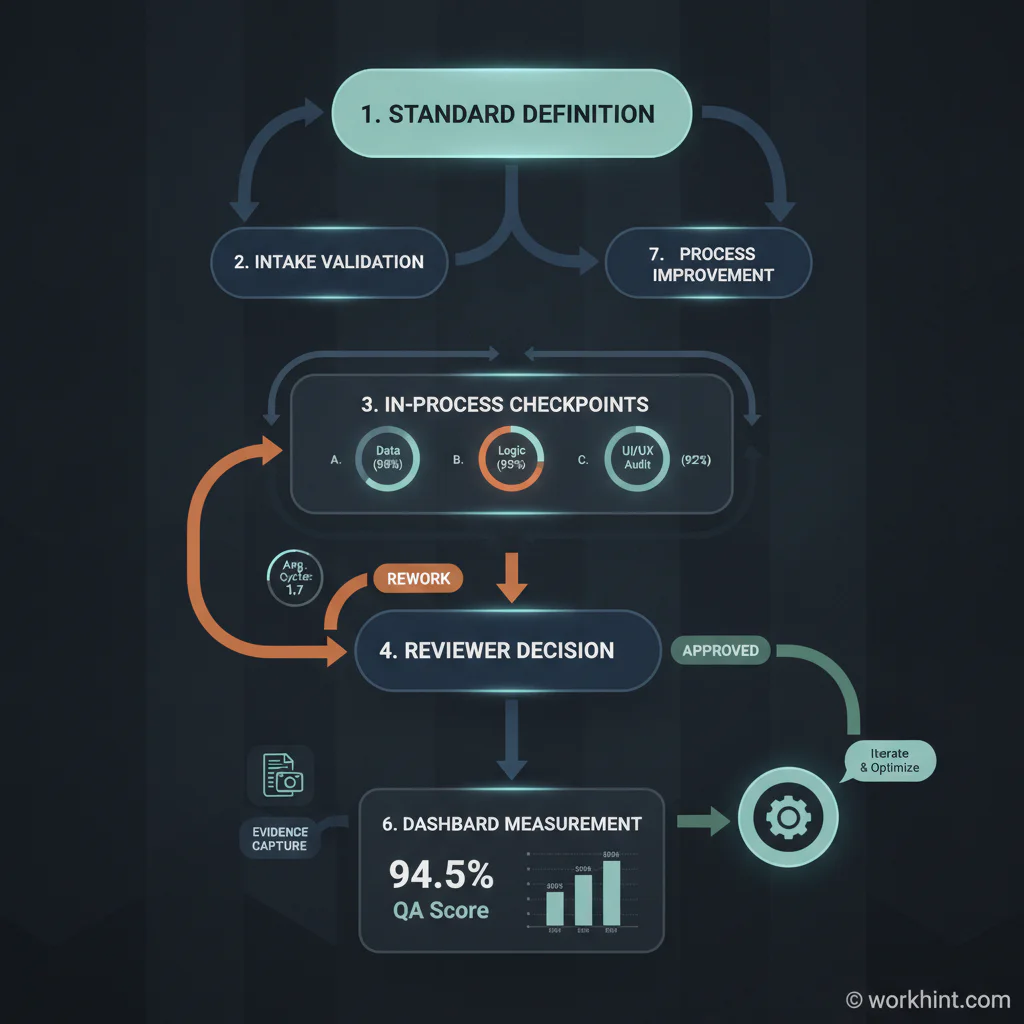
Many teams treat quality assurance as a final inspection. That is too late. By the time work reaches the last reviewer, the cost of correction is higher, context is weaker, and deadlines are already under pressure. A better QA process places quality checkpoints inside the workflow itself, so defects, missing information, unclear ownership, and policy exceptions are visible while the work can still be fixed cleanly.
What’s in this article?
- What a quality assurance workflow is
- Why QA belongs inside the operating process
- A practical framework for designing QA checkpoints
- A checklist operations teams can adapt
- Common QA workflow mistakes
- Where Workhint fits
Why quality assurance workflow matters
Quality problems rarely come from one careless person. They usually come from weak systems: unclear standards, missing handoffs, rushed approvals, undocumented exceptions, or review steps that happen after the real decision has already been made. A workflow makes those risks explicit.
The U.S. Chamber of Commerce recommends building quality assurance around standards, policies, procedures, and measurable checks, not vague expectations. Penn State Extension makes a similar point in its guide to standard operating procedures: clear procedures improve communication, consistency, and training. In operations, that means QA cannot live in a forgotten policy document. It has to show up in the work path.
The goal is not bureaucracy. The goal is a repeatable system that helps people do good work without guessing. A strong quality assurance workflow reduces rework, protects customer trust, makes accountability visible, and gives managers real evidence about where the process is failing.
Start with the quality standard
Before designing checkpoints, define the standard. What does acceptable work mean? What must be accurate, complete, timely, compliant, approved, documented, or customer-ready?
For a customer onboarding process, the standard may include complete customer data, signed agreements, configured permissions, confirmed implementation dates, and a readiness review. For a vendor payment process, it may include approved scope, matching invoice details, tax documentation, payment authorization, and audit evidence. For field service, it may include photos, completion notes, customer confirmation, safety checks, and exception reporting.
Use the standard to separate required quality from personal preference. If reviewers debate style, format, or ownership every time, the workflow will slow down. If the standard is objective, reviewers can decide faster and operators can fix issues without waiting for interpretation.
Design the workflow around risk points
Do not add QA checks everywhere. Add them where failure is expensive, likely, irreversible, customer-visible, compliance-sensitive, or hard to diagnose later. The best checkpoints sit just before work changes state: before approval, before customer delivery, before payment, before launch, before handoff, or before closeout.
A useful QA workflow usually includes five layers. First, intake validation confirms the work has enough information to start. Second, in-process checks catch errors while the owner can still correct them. Third, reviewer approval confirms the work meets the defined standard. Fourth, exception handling routes defects, risks, or missing information to the right person. Fifth, measurement shows whether the workflow is improving or creating new bottlenecks.
Quality assurance workflow checklist
| Workflow element | What to define | Evidence to capture | Metric to watch |
|---|---|---|---|
| Quality standard | What acceptable work means | Checklist, SOP, acceptance criteria | Defect rate |
| Checkpoint owner | Who reviews and who fixes | Reviewer name, decision, timestamp | Review cycle time |
| Exception path | What happens when work fails QA | Issue type, reason, assigned resolver | Rework volume |
| Approval rule | What can move forward automatically | Pass/fail record, approval notes | Approval delay |
| Improvement loop | How repeated defects change the process | Root cause, process update, owner | Repeat defect rate |
This table is intentionally practical. If a checkpoint does not produce evidence, it is hard to audit. If it does not produce a metric, it is hard to improve. If it does not assign ownership, it becomes a comment thread instead of a work system.
Connect QA to corrective action
A QA workflow should not only reject work. It should explain what happens next. When a reviewer finds a defect, the workflow should route the item back to the right owner, identify the issue category, preserve the reviewer note, and make the corrected version easy to compare.
ISO 9001, the international quality management standard, emphasizes consistent processes and continual improvement. That principle matters even when a company is not pursuing certification. Repeated QA failures are process signals. They may mean the intake form is missing information, training is weak, the SOP is unclear, the approval rule is too late, or the team is overloaded.
Microsoft’s quality management workflow documentation for Business Central shows how workflow events can trigger quality actions when inspections are created, completed, or meet certain conditions. The broader lesson is simple: once the rules are clear, quality steps can be routed, tracked, and automated instead of managed manually in email.
Common mistakes
- Putting QA only at the end. Final review catches defects after delay and rework have already accumulated.
- Confusing approval with quality. A manager can approve work without checking whether it meets the actual standard.
- Skipping evidence. If the workflow does not record decisions, the team cannot learn from defects or prove compliance.
- Making every item high risk. Low-risk work should move quickly. Save deeper review for material risk, customer impact, or repeated failure patterns.
- Measuring activity instead of outcomes. Count rework, defect rate, cycle time, reopen rate, and customer-impacting errors, not only the number of reviews completed.
Where Workhint fits
Workhint helps turn a quality assurance workflow from a document into a live operating system. A team can describe the work process, then structure intake fields, roles, permissions, checkpoints, approvals, exception paths, dashboards, and automation around that process.
For example, a service delivery team could use Workhint to validate request data at intake, assign work based on role and capacity, require a QA checkpoint before delivery, route failed checks back to the owner, preserve evidence, and show managers which defect categories are increasing. The value is not that Workhint replaces judgment. The value is that judgment happens in the right place, with the right context, and leaves a record the team can improve from.
FAQ
What is a quality assurance workflow?
A quality assurance workflow is a structured process for checking whether work meets defined standards before it moves forward. It includes checkpoints, owners, review criteria, evidence, exception handling, and improvement loops.
What is the difference between quality assurance and quality control?
Quality assurance is proactive and process-focused. It designs the system that helps prevent defects. Quality control is usually more inspection-focused and checks whether a specific output meets the standard.
Who should own a QA workflow?
One accountable process owner should own the workflow design, but checkpoint ownership may sit with operations, compliance, managers, subject-matter experts, or customer-facing teams depending on the risk being reviewed.
How many QA checkpoints should a workflow have?
Use the fewest checkpoints needed to manage real risk. Add checks before irreversible, customer-visible, regulated, expensive, or frequently defective steps. Remove checks that do not improve quality or decision speed.
Conclusion
A quality assurance workflow is not a layer of control added after work is done. It is the way a company designs quality into the path work already follows. Define the standard, place checkpoints at real risk points, assign owners, capture evidence, measure rework, and use repeated defects to improve the system. That is how quality becomes scalable instead of dependent on memory, heroics, or last-minute review.
Leave a Reply