


You can launch a video editing business before hiring editors by selling clear packages and routing work to trusted freelancers.
If you are researching how to start a video editing business, the opportunity is no longer limited to solo freelancers with expensive studio setups. Brands, creators, coaches, agencies, and local companies all need more short-form clips, YouTube edits, ads, webinars, product videos, and social content than their internal teams can comfortably produce.
The faster path is to launch as a branded editing service with a small provider network. You define the offer, build a simple intake and delivery process, recruit independent editors, validate demand with a few focused packages, and only invest more once paid work proves the niche.
What’s in this article?
- Why video editing works as a low-overhead service business
- What you need before selling your first package
- How to price editing services without custom quoting every job
- How to find the first customers
- How Workhint can operate the business from request to payout
Why This Business Works
Video demand keeps expanding because companies are expected to publish across more channels with shorter turnaround times. A founder, creator, or marketing team may need long-form YouTube edits, clips for TikTok and Reels, paid ad variations, testimonial edits, and webinar repurposing in the same month.
That creates a useful opening for a focused editing business. You do not need to be a full creative agency. You can start with one specific customer and one repeatable result, such as short-form clips for B2B founders, podcast repurposing for coaches, or product video edits for ecommerce brands.
The provider-network model matters because editing capacity is the bottleneck. Instead of hiring employees before revenue exists, you can recruit freelance editors by niche, style, turnaround time, and software skill. Customers buy the branded service experience. Editors deliver the work through your process.
What You Need To Launch
The first version should be lean. You need a brand, a clear service menu, an intake process, a way to collect assets, a review process, simple contracts, payment collection, and a small bench of independent editors. You do not need an office, full-time staff, or a large equipment budget.
| Launch item | Lean budget | What it covers |
|---|---|---|
| Business registration | $50-$500 | Entity setup, local filing, and basic business records |
| Brand and domain | $25-$200 | Name, domain, email, and a simple branded presence |
| Editing software access | $0-$100/month | DaVinci Resolve, Adobe, CapCut, or editor-owned tools |
| Cloud storage | $10-$50/month | Client assets, drafts, exports, and project files |
| Contract templates | $0-$300 | Scope, revision limits, usage rights, deposits, and cancellation terms |
| Insurance | $25-$100/month | General liability or professional coverage when contracts justify it |
| Initial marketing | $0-$500 | Portfolio samples, outreach, landing page, and test ads if needed |
| Workhint platform setup | Variable | Customer intake, editor onboarding, approvals, payments, and reporting |
Your first operational decision is whether you are selling editing labor or a business outcome. Editing labor sounds like hours. A business outcome sounds like ten publish-ready clips every month, a weekly YouTube edit, or a webinar repurposing package with clear deliverables and deadlines.
How To Price It
Start with packages. Hourly billing is easy to understand but hard to scale because customers compare rates instead of outcomes. Packages make the buying decision simpler and let you assign work to editors with predictable margins.
| Package | Example scope | Example price | Best customer |
|---|---|---|---|
| Starter clips | 8 short-form clips per month | $600-$1,200/month | Founders, coaches, and small creators |
| YouTube support | 4 long-form edits plus thumbnails or clips | $1,500-$3,500/month | Growing channels and education brands |
| Ad creative edits | 10-20 ad variations from existing footage | $1,000-$4,000/month | Ecommerce and paid social teams |
| Podcast repurposing | Episodes, clips, captions, and social cuts | $1,200-$3,000/month | Podcasters and B2B media teams |
Protect the margin before you sell. Define how many revision rounds are included, what counts as a new video, who supplies footage, how quickly feedback is due, and when extra editing becomes billable. Require a deposit or monthly prepayment for new clients.
How To Get First Customers
Pick one niche and build proof for it. A general video editing business is easy to ignore. A service that turns founder podcasts into LinkedIn clips, or turns ecommerce footage into paid social ad variants, is easier to buy.
Create three sample edits that match the niche. Then contact prospects who already publish video but have inconsistent quality, weak clipping, slow turnaround, or underused long-form content. Send a specific observation and one useful idea. The goal is not mass outreach. The goal is to start conversations with buyers who already believe video matters.
Good first channels include creator communities, LinkedIn outreach, YouTube channels in a narrow niche, podcast hosts, ecommerce brands, local agencies, and marketing consultants who need a white-label editing partner.
How Workhint Helps Launch It
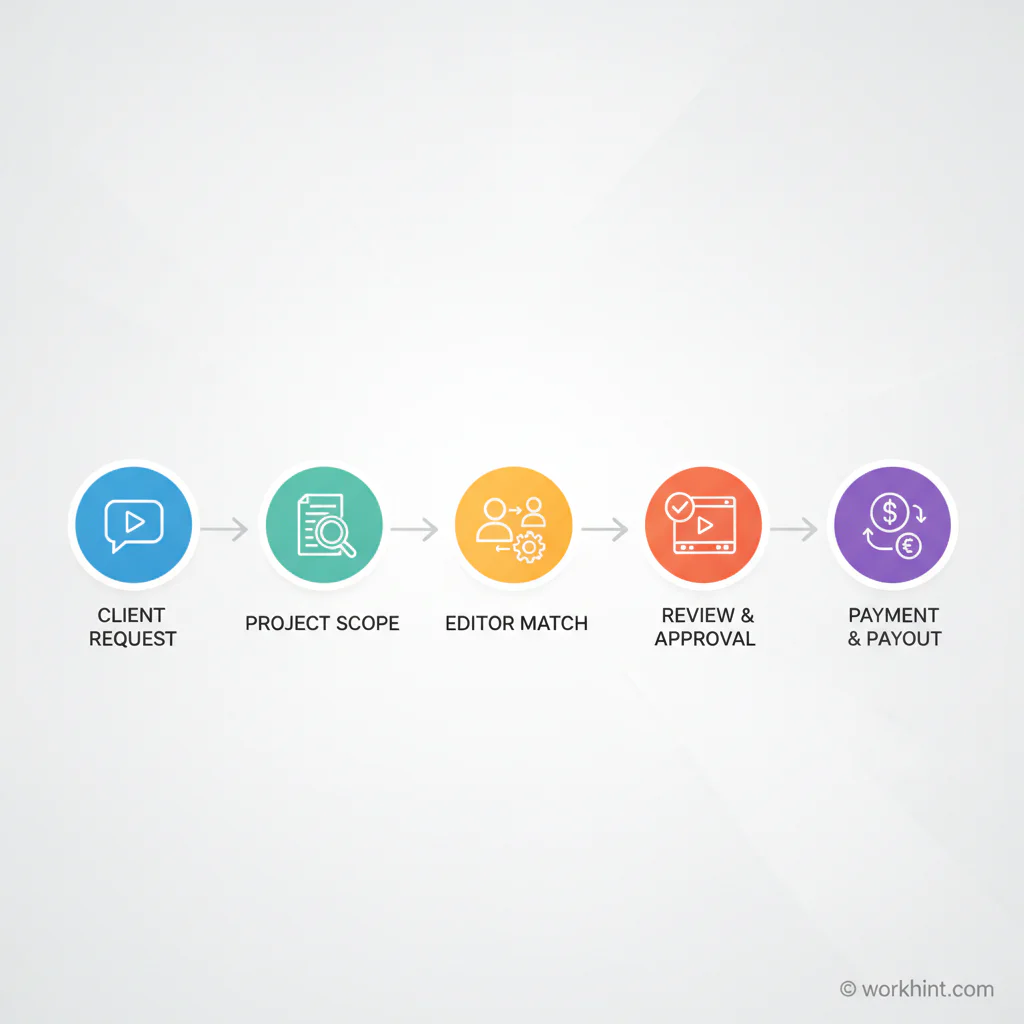
Workhint can become the branded operating platform for the video editing business before you build custom software or hire a coordinator. A customer submits a video request through your branded portal, uploads raw footage, chooses a package, approves the scope, and pays through the same system.
Behind the scenes, Workhint routes the job to the right independent editor based on style, capacity, niche, and turnaround time. The editor receives the assignment, deadline, asset links, checklist, and delivery requirements. The customer reviews the first cut, requests revisions inside the portal, approves the final version, and receives the export. You track status, margins, editor performance, revisions, invoices, and payouts from one operating dashboard.
That is the launch advantage. Instead of stitching together forms, file links, spreadsheets, payment tools, and manual follow-ups, you can sell the service as a real branded platform from day one while keeping the provider network flexible.
First 7-Day Launch Plan
- Day 1: Choose one niche, one customer type, and one flagship package.
- Day 2: Set up the branded Workhint platform basics, including intake, customer dashboard, and editor roles.
- Day 3: Build the pricing, project brief, review, approval, payment, and editor payout process.
- Day 4: Recruit three to five independent editors and review sample work.
- Day 5: Create three niche-specific portfolio samples and a short landing page.
- Day 6: Contact 30 targeted prospects with specific observations about their current video output.
- Day 7: Review replies, book calls, test the intake flow, and avoid buying tools until demand is clear.
Final Launch Checklist
- Choose a narrow editing niche and package.
- Create a business name, domain, and basic brand.
- Set revision limits, turnaround times, and payment terms.
- Configure the branded Workhint intake, approval, delivery, and payout workflow.
- Recruit a small network of independent editors.
- Create sample edits that match the target customer.
- Start outreach before investing in expensive software, staff, or office space.
- Use the first customers to validate pricing, scope, and fulfillment quality.
FAQ
How much does it cost to start a video editing business?
A lean launch can start with a few hundred dollars if you already have a computer and can use affordable editing tools, cloud storage, a domain, and basic marketing. Costs rise when you buy hardware, paid software, insurance, or outside creative help.
Can I start a video editing business with no staff?
Yes. Start by selling a defined package and using independent editors for fulfillment. Keep quality control, customer communication, pricing, and delivery standards under your brand.
Do I need to be a professional editor?
You need enough editing judgment to define quality and review work. If you are not the primary editor, your role is to sell the package, recruit skilled providers, manage the workflow, and protect the customer experience.
What is the best niche for a new video editing business?
The best niche is one where customers publish frequently and already understand the value of video. Examples include YouTube creators, podcast hosts, ecommerce brands, coaches, SaaS founders, and local agencies.
How should I price video editing services?
Use fixed packages when possible. Define deliverables, turnaround time, revision rounds, and asset requirements. Monthly retainers are usually better than one-off projects once you have repeatable demand.
How do I get the first clients?
Build niche-specific samples, identify prospects already publishing video, and send specific outreach that shows how you would improve their current content. Partnerships with agencies and consultants can also produce early referrals.
When should I hire employees?
Hire only after demand, margins, and quality standards are proven. Until then, use independent editors and invest in process, review standards, and customer acquisition.
Conclusion
A video editing business is attractive because demand is visible before you invest heavily. If customers already publish video and need more output, you can validate a package quickly.
Start with a branded platform, a focused niche, a small provider network, and a clear operating process. Workhint gives you the foundation to sell the business like a real service platform while you stay lean enough to learn from the market.
Leave a Reply