


A good prequalification checklist keeps risky subcontractors from reaching the job before the business is ready.
A subcontractor prequalification checklist helps a business decide whether a subcontractor is ready for specific scope before work starts. It is the gate between “we need help” and “this outside party can safely perform work for us.”
That matters because subcontractors can affect delivery, safety, budgets, data access, insurance exposure, and payment disputes. Procore describes subcontractor prequalification as a process that often reviews financial health, safety records, and project experience before award. The Texas Department of Transportation, for example, says contractors must qualify to become eligible to bid or receive a bid proposal.
This is not legal, insurance, or procurement advice. Adapt it with the right internal owners for your industry.
What’s in this article?
- What a subcontractor prequalification checklist should include.
- A step-by-step prequalification workflow for business teams.
- A review table for documents, owners, and approval gates.
- Common mistakes that create project or payment problems.
- Where Workhint fits when subcontractor approval needs to become repeatable.
Why subcontractor prequalification matters
Subcontractor prequalification matters because price and availability are not enough. A subcontractor may be responsive but still lack the insurance, licenses, safety record, capacity, or access controls required.
Prequalification should answer five questions before a manager assigns work:
- Can this subcontractor legally and practically perform the work?
- Does the subcontractor have the right documentation, coverage, and approvals?
- Is the scope within the subcontractor’s proven capacity?
- What risk tier should this subcontractor fall into?
- Who must approve the subcontractor before activation?
Those questions prevent a common failure: teams collect documents once, then let managers assign work without knowing whether the subcontractor is approved for that job or access level.
Subcontractor prequalification checklist
Adjust this checklist by work type, location, safety exposure, and contract value.
| Checklist area | What to collect or verify | Primary owner | Approval gate |
|---|---|---|---|
| Business identity | Legal name, address, tax ID, ownership, business registration, contact details | Procurement or operations | Vendor record created |
| Scope fit | Services offered, relevant experience, project size, locations, equipment, capacity | Project owner | Eligible for the requested work type |
| Licenses and certifications | Trade licenses, permits, industry credentials, required renewals | Compliance or operations | Required credentials current |
| Insurance | Certificate of insurance, coverage limits, expiration dates, additional insured terms if required | Risk, legal, or finance | Coverage meets policy |
| Safety and quality | Safety program, incident history, quality process, training records, inspection history | Safety or operations | Risk tier assigned |
| Financial and performance history | References, prior project performance, disputes, bankruptcy history, backlog, financial review where appropriate | Procurement and finance | Award limit approved |
| Access and data needs | Systems, facilities, customer data, credentials, equipment, access start and end dates | IT or security | Least access required documented |
| Commercial terms | Rates, payment terms, invoice rules, change order process, retainage or milestone rules if applicable | Finance and legal | Payment path approved |
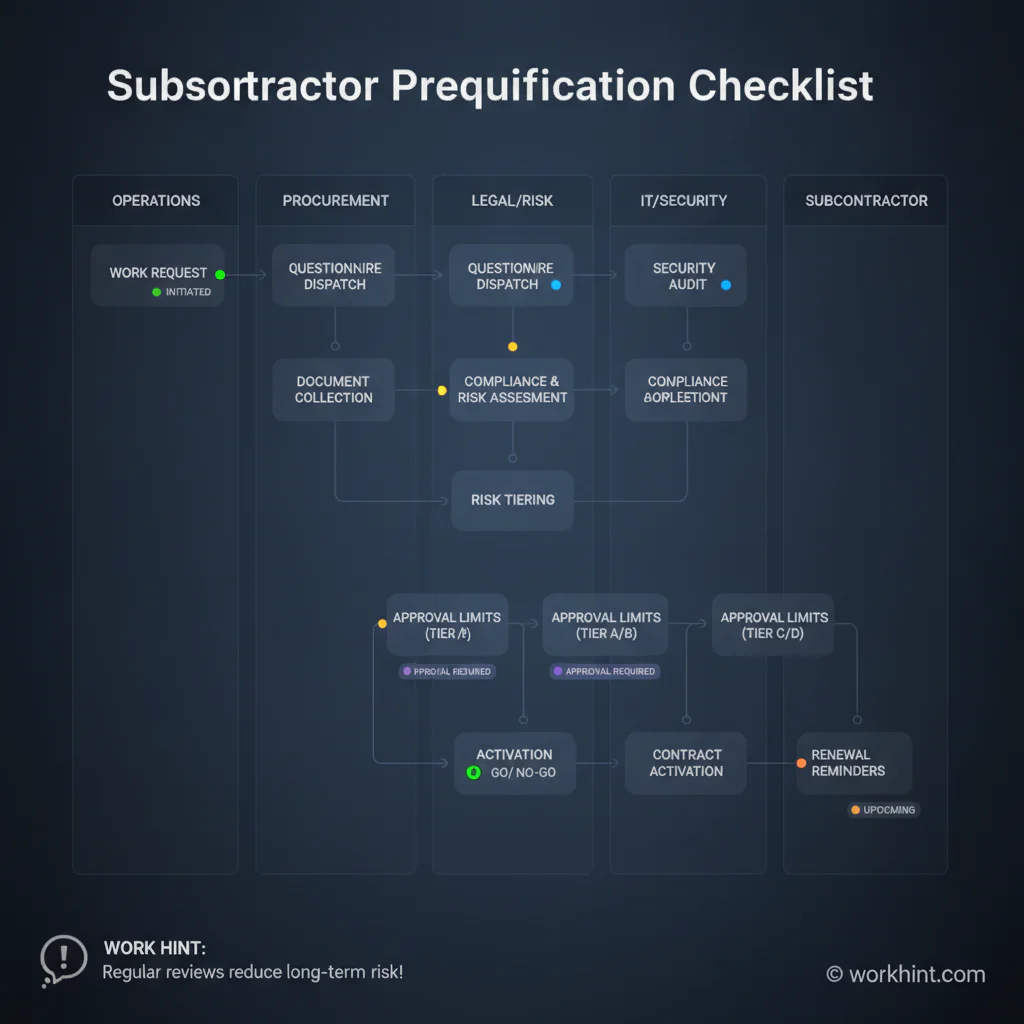
Subcontractor prequalification process
A checklist works best when it sits inside a clear workflow. Otherwise, managers may treat prequalification as paperwork instead of an approval decision.
- Start with the work request. Capture scope, location, timeline, budget, customer impact, access needs, and risk level before inviting subcontractors to submit information.
- Send one standardized questionnaire. Ask for business identity, capabilities, licenses, insurance, safety information, references, financial information when appropriate, and work examples.
- Check completeness first. Formal programs often reject incomplete submissions. The South Carolina OSE prequalification handbook notes that incomplete, unsigned, or missing supplemental material may result in disqualification. In private businesses, incomplete packets should pause the workflow.
- Route reviews by domain. Operations reviews capability, safety reviews exposure, finance reviews payment risk, legal reviews terms, and IT reviews access if systems or data are involved.
- Assign an approval tier. Do not make approval binary if risk varies. A subcontractor may be approved for low-risk work, limited contract value, one geography, or a specific service line.
- Set expiration and renewal rules. Insurance, licenses, safety records, and financial information should not stay approved forever. TxDOT’s contractor qualification program includes annual requalification, a useful reminder that eligibility should be maintained, not assumed.
- Connect approval to activation. A subcontractor should not receive a work order, system access, or payment setup until the required gates are complete.
How to score subcontractor risk
Scoring keeps the review from becoming subjective. Use a simple model that separates low-risk services from safety-sensitive, customer-facing, regulated, or high-value work.
| Risk tier | Typical triggers | Required review |
|---|---|---|
| Low | Limited scope, no sensitive access, low contract value, remote work, no safety exposure | Business identity, scope, agreement, payment setup |
| Medium | Customer-facing work, repeated assignments, system access, moderate spend, location visits | Insurance, references, access review, manager approval, finance approval |
| High | Safety-sensitive work, regulated data, large contract value, critical operations, subcontractor crews | Legal, risk, safety, finance, executive approval, renewal reminders |
IRMI’s guidance on subcontractor operational prequalification emphasizes that nonfinancial evaluation can include licensing, insurance, litigation history, default history, experience, safety practices, and operational fit. That is the right mindset: prequalification should protect the project, not just complete a vendor file.
Common mistakes
- Approving the company but not the scope. A subcontractor approved for one service may not fit a different job, location, access level, or contract value.
- Letting expired documents stay invisible. Insurance certificates, licenses, and certifications need renewal dates, reminders, and owners.
- Skipping the access question. Some subcontractors need building, customer, file, or system access. Approval should define what access is needed and when it ends.
- Using the same review for every subcontractor. Low-risk work should not crawl through a heavy process, and high-risk work should not move through a light one.
- Separating prequalification from payment setup. Finance needs the vendor record, tax details, invoice rules, payment terms, and approval owner before the first invoice arrives.
- Failing to keep decision records. If a dispute, safety issue, failed delivery, or audit question appears later, the business needs to know who approved what and why.
Where Workhint fits
Workhint fits when subcontractor prequalification needs to move from scattered forms into a live operating workflow. A business can use Workhint to create subcontractor intake, collect documents, assign review owners, route approvals by risk tier, track insurance and license expirations, manage role-based access tasks, connect approved subcontractors to assignments, and keep payment readiness tied to accepted work.
That is useful when multiple teams touch the process. Operations may care about capacity. Legal may care about terms. Finance may care about payment setup. IT may care about access. Workhint keeps those reviews connected so approval is visible before a subcontractor starts work.
FAQ
What is subcontractor prequalification?
Subcontractor prequalification is the process of reviewing a subcontractor’s identity, capabilities, documents, insurance, safety record, references, and operational fit before approving them for work.
What should a subcontractor prequalification checklist include?
It should include business identity, scope fit, licenses, insurance, safety and quality information, references, financial review where appropriate, access needs, commercial terms, approval owners, and renewal dates.
How often should subcontractors be requalified?
Many teams review subcontractors annually, but the cadence should depend on risk, contract value, insurance expiration, license renewal, safety exposure, and whether the subcontractor’s scope changes.
Who owns subcontractor prequalification?
Ownership is usually shared. Procurement or operations owns the workflow, the business owner reviews scope, finance reviews payment and financial risk, legal reviews terms, safety reviews safety exposure, and IT reviews access when needed.
Is subcontractor prequalification only for construction?
No. It is common in construction, but the same operating logic applies to facilities, field service, healthcare support, logistics, agencies, installation partners, IT service providers, and any outside provider that affects delivery or risk.
Conclusion
A subcontractor prequalification checklist should do more than collect paperwork. It should help the business decide who is eligible, what work they can perform, what limits apply, which approvals are required, and when the record must be refreshed. When prequalification connects documents, owners, risk tiers, access, assignments, and payments, subcontractors can start faster with less avoidable risk.
Leave a Reply