


A time off request form should protect employee clarity, manager planning, payroll accuracy, and team coverage.
A time off request form template gives employees a consistent way to request PTO, sick leave, unpaid leave, bereavement, jury duty, parental leave, or other approved absences. For managers, the form creates a reliable record: who is requesting time away, which dates are affected, whether coverage is needed, who approved it, and what must be updated in HR or payroll systems.
The form is not a replacement for a leave policy. It is the operational layer that makes the policy usable. A policy explains eligibility, accrual, carryover, required notice, and legal rules. The request form captures the actual request and routes it through the right decision path.
What is included in this template?
- A copy-ready time off request form structure.
- A field-by-field guide for HR, managers, and operations teams.
- A practical approval workflow from employee request to payroll update.
- Common mistakes that create coverage gaps or inconsistent approvals.
- FAQ for business teams managing PTO, leave, and absence records.
How to use this time off request form template
Use the form for planned absences and any unplanned absence that still needs a business record. Before rolling it out, compare the fields against your PTO policy, sick leave rules, collective bargaining agreements, state requirements, and HR system setup. Leave law can be sensitive, so treat this as an operations template, not legal advice.
For protected leave, the request form should trigger review by HR rather than leaving the decision only with a line manager. The U.S. Department of Labor explains that eligible employees may receive up to 12 workweeks of unpaid, job-protected leave in a 12-month period for qualifying Family and Medical Leave Act reasons. DOL Fact Sheet #28 gives additional employer and employee guidance. If a request may involve protected leave, accommodations, disability, pregnancy, military leave, or local paid sick leave, route it carefully.
Time off request form template
Copy this structure into a form builder, HRIS, spreadsheet, document, or internal request system.
| Section | Field | What to capture | Owner |
|---|---|---|---|
| Employee details | Name, role, department, manager | Identify the person, reporting line, and team affected by the absence. | Employee |
| Request details | Leave type | Vacation, sick, personal, bereavement, jury duty, unpaid, FMLA, parental, or other. | Employee |
| Dates | Start date, end date, partial day, hours | Show the exact time away from work and whether the request uses days or hours. | Employee |
| Notice | Date submitted | Confirm whether the request meets policy notice requirements. | Employee |
| Work coverage | Coverage plan | Name urgent tasks, customer commitments, shift coverage, handoffs, or backup owner. | Employee and manager |
| Balance check | Available PTO or leave balance | Confirm whether the employee has enough available time under the relevant policy. | HR or payroll |
| Approval | Manager decision, date, notes | Record approved, denied, pending, or needs HR review with a reason if denied. | Manager |
| Record update | Calendar, HRIS, payroll, schedule | Confirm systems were updated after approval. | HR, payroll, or operations |
Time off request form workflow
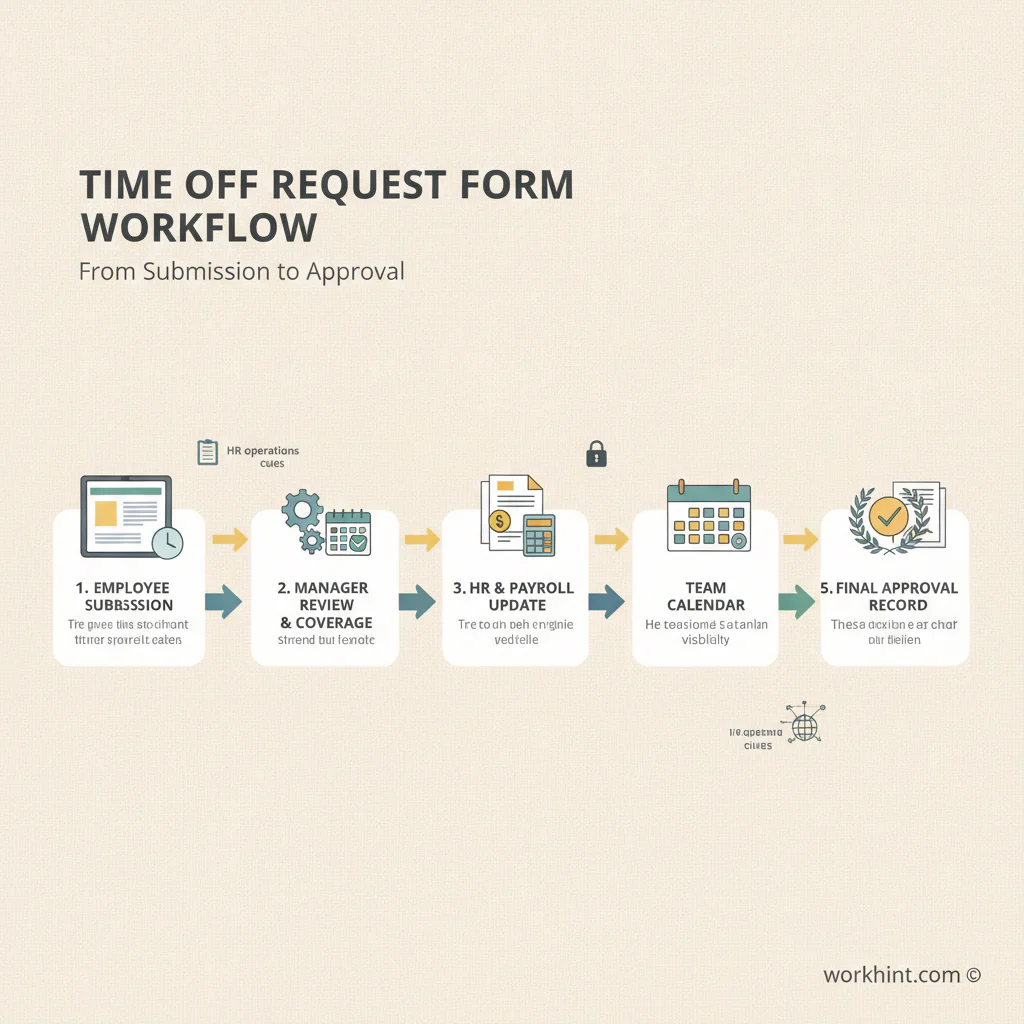
A useful form needs a clear path after submission. Many templates stop at employee name, dates, and signature. That creates a document, but not a reliable process.
- Employee submits the request. The form captures the leave type, dates, hours, reason if required by policy, and any coverage notes.
- Manager checks coverage. The manager reviews workload, customer commitments, staffing levels, deadlines, and conflicts with other approved absences.
- HR or payroll checks eligibility. This may include available PTO balance, sick leave rules, protected leave triggers, unpaid leave treatment, or required documentation.
- Decision is recorded. Approved, denied, or pending requests should include the decision date and approver. Denials should be tied to policy or business coverage, not informal preference.
- Systems are updated. The schedule, payroll system, HR record, shared calendar, staffing plan, and backup owner list should reflect the approved absence.
SHRM provides a sample PTO leave request form, and Indeed’s employer guidance on paid time off request forms highlights common leave categories and form fields. Clockify’s collection of time off request templates also shows how common this need is for teams that still manage requests with documents or spreadsheets.
Example request
| Field | Example entry |
|---|---|
| Employee | Avery Johnson, Customer Operations Specialist |
| Leave type | Vacation PTO |
| Dates requested | August 17 to August 21, 2026 |
| Total time | 5 workdays |
| Coverage plan | Jordan covers priority inbox. Open customer escalations handed off by August 14. |
| Balance check | Available balance: 8 days |
| Manager decision | Approved July 29, 2026 |
| Record update | HRIS, team calendar, and support schedule updated. |
Common mistakes to avoid
- Using one free-text box for every request. Managers need structured dates, leave type, hours, and coverage notes to make a fair decision.
- Skipping balance verification. Approval should not depend on memory. Confirm available balances before the request reaches payroll.
- Letting managers handle protected leave alone. Requests that may involve legal leave, medical leave, disability, or accommodations should route to HR.
- Approving time off without updating schedules. The approval is incomplete until calendars, shifts, payroll, and handoffs are updated.
- Failing to document denials. If a request is denied, record the business reason, policy basis, and any alternative dates offered.
Where Workhint fits
Workhint helps teams turn a time off request form template into a live workflow. Instead of collecting requests in email or a static spreadsheet, a business can create an intake form, route manager approval, check HR or payroll ownership, assign coverage tasks, update status, and keep a record tied to the employee, team, schedule, and policy.
That matters when requests affect shift coverage, customer operations, contractor coordination, project milestones, or payroll timing. The template sets the standard. Workhint helps digitize the path from request to approval to operational handoff.
FAQ
What should a time off request form include?
It should include employee details, leave type, requested dates, total hours or days, submission date, coverage notes, PTO balance or eligibility check, manager approval, HR review when needed, and final record update.
Is a time off request form the same as a PTO policy?
No. A PTO policy explains eligibility, accrual, carryover, notice, payout, and approval rules. A time off request form captures a specific absence request and routes it through the approval workflow.
Who should approve time off requests?
The direct manager usually approves ordinary vacation or PTO requests because they understand coverage. HR should review requests involving protected leave, policy exceptions, unpaid leave, documentation, or legal risk.
Can a time off request be denied?
Yes, depending on the policy, leave type, staffing needs, timing, and legal requirements. Denials should be consistent, documented, and connected to clear business or policy reasons.
Should time off requests be kept as records?
Yes. Keep approved and denied requests with the decision date, approver, leave type, and related schedule or payroll updates. Retention rules may vary by location and leave type.
Conclusion
A time off request form template keeps absence planning from becoming a private message chain. The best version is simple enough for employees to use and structured enough for managers, HR, payroll, and operations to trust.
Start with the fields above, connect the form to your policy, and make sure every approved request creates the right coverage, calendar, payroll, and recordkeeping updates.
Leave a Reply