


Process mining turns scattered system activity into a clear picture of how work actually moves.
Process mining is a method for analyzing business processes from the event data already created by systems such as CRM, ERP, ticketing, finance, HR, field service, procurement, or workflow tools. Instead of asking people how a process is supposed to work, process mining shows how the process actually runs: which steps happen, where work waits, which paths repeat, and where the real process differs from the documented one.
For operations teams, process mining is useful because it gives evidence for redesigning work. It can show where requests stall, where approvals pile up, where cases bounce between teams, and which process variants produce better outcomes. The value comes when those insights become a work system with clear ownership, rules, escalation paths, automation, and measurable performance.
What’s in this article?
- What process mining means in business operations.
- The data process mining needs to work.
- How process discovery, conformance checking, and enhancement differ.
- A practical workflow for using process mining findings.
- Where Workhint fits when turning insights into a live operating system.
Why process mining matters
Most teams do not run one clean version of a process. They run the documented process, the shortcut process, the urgent customer process, and the process people invented because the official one was too slow. That variation is often invisible until it shows up as missed SLAs, rework, approval delays, duplicate data entry, or customer frustration.
The IEEE Process Mining Manifesto describes process mining as extracting knowledge from event logs to discover, monitor, and improve processes. Event logs are closer to reality than workshop notes. A log can show that invoices wait three days before review, onboarding cases loop through compliance twice, or support requests routed to one queue have twice the cycle time of another queue.
What process mining needs from your systems
Process mining starts with event logs. An event log is a record of what happened to a specific case at a specific time. Microsoft Learn explains that process mining analysis typically needs fields such as a case ID, an activity name, and a timestamp. The case might be a purchase request, onboarding flow, support ticket, invoice, claim, job, project, or contractor application.
| Data field | Business meaning | Example |
|---|---|---|
| Case ID | The item moving through the process | Invoice 1049 or ticket 8821 |
| Activity | The step that happened | Submitted, reviewed, approved, paid |
| Timestamp | When the step happened | 2026-07-19 09:42 |
| Owner or resource | Who or what performed the step | Finance reviewer or automation rule |
| Status or outcome | What changed as a result | Approved, rejected, returned for edits |
Clean data matters. If tools use different IDs, timestamps are missing, or manual work happens outside the system, the analysis will be incomplete. Treat the first pass as a diagnostic view rather than absolute truth.
How process mining works
Most process mining work falls into three modes. IBM describes these as discovery, conformance checking, and enhancement. Discovery builds a model from actual event data. Conformance checking compares real execution against the intended process. Enhancement uses the findings to improve the model by identifying bottlenecks, variants, or automation opportunities.
Google Cloud describes process mining as analyzing event logs to discover, monitor, and improve business processes. The important point for operators is that the output is not just a diagram. The output is an evidence base for deciding what to change.
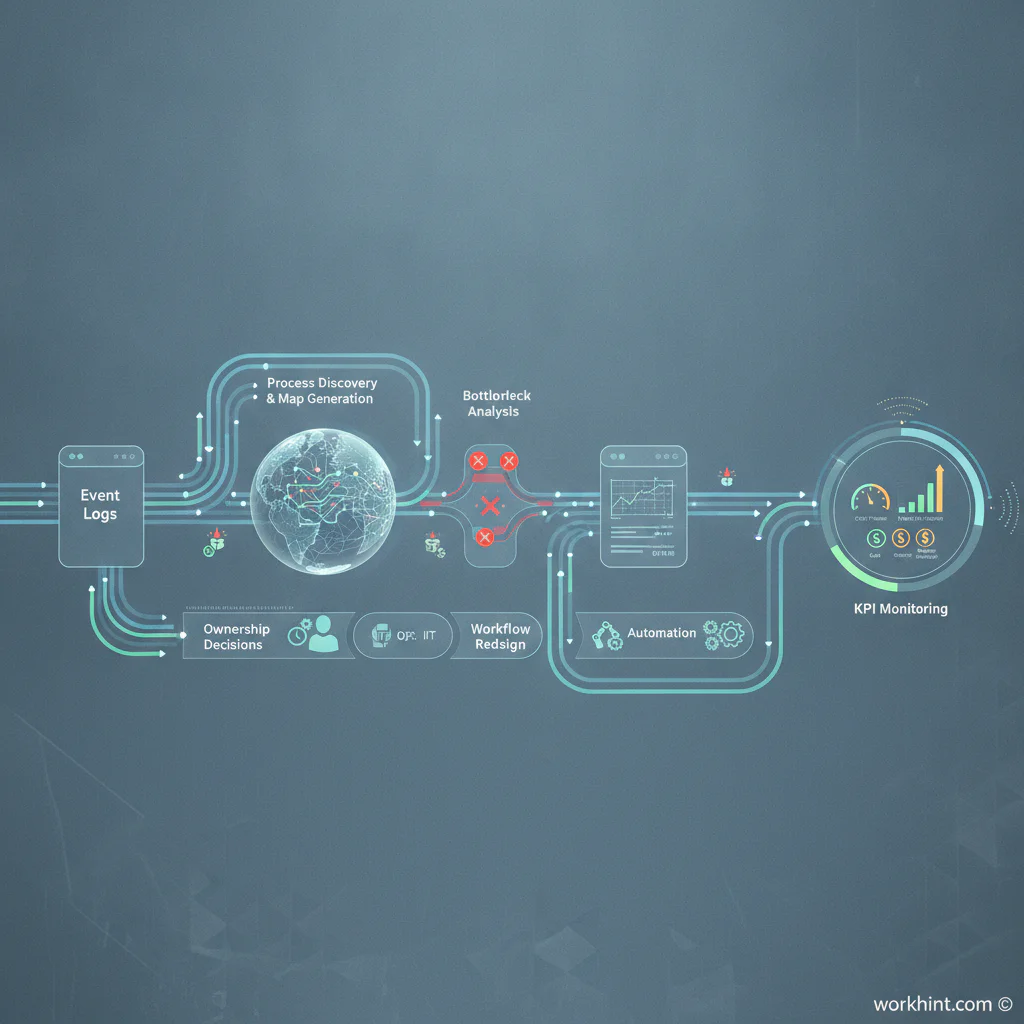
A process mining workflow operations can use
- Choose one process. Start with a high-volume or high-friction workflow such as vendor approval, customer onboarding, invoice processing, field service dispatch, employee onboarding, internal requests, or implementation handoffs.
- Define the case. Decide what item moves through the process. If the case is unclear, the analysis will blur multiple processes together.
- Pull event data. Export the case ID, activity, timestamp, owner, status, and outcome fields from the systems of record.
- Map the real process. Use the mining output to see the most common paths, uncommon variants, repeated steps, skipped steps, and wait times.
- Compare intent to reality. Ask where the process differs from the SOP, policy, service promise, or customer expectation.
- Prioritize operating fixes. Look for delays with business impact, rework loops, unclear ownership, unnecessary approvals, missing information, or handoffs without accountability.
- Turn changes into a system. Update roles, intake rules, required fields, routing logic, permissions, SLAs, escalation rules, dashboards, and review cadence.
- Monitor after the change. Re-run the analysis after changes go live so the team can see whether cycle time, rework, exceptions, and outcomes improved.
What to look for in the findings
Good process mining analysis should help the team make decisions, not admire a complex map. The most useful signals include long waits, repeated loops, excessive variants, skipped controls, late approvals, owner bottlenecks, low-value handoffs, and cases that require manual rescue.
One useful question is, “Which pattern should become the standard?” If one team completes onboarding in three steps while another needs seven, the goal is to understand whether the faster path has better intake, clearer ownership, fewer approvals, or better automation.
Common mistakes
The first mistake is treating process mining as a reporting project. Reports show what happened; work systems change what happens next. A dashboard that says approvals are slow is not enough. The team needs a redesigned approval workflow with decision rights, fallback rules, reminders, and escalation.
The second mistake is mining a process nobody owns. If there is no accountable process owner, findings become interesting but unactioned. Assign an owner before the analysis starts.
The third mistake is automating every bottleneck. Some delays come from missing data, unclear policy, overloaded specialists, or decision risk. Automation helps when the rule is clear. Human review is still needed when judgment, compliance, or exception handling matters.
Where Workhint fits
Workhint fits after the team understands what the process mining data is saying. The mining output can show the real path of work; Workhint helps turn the redesigned process into a live work system with roles, intake forms, permissions, assignment rules, approvals, documents, schedules, notifications, escalation paths, dashboards, and automation.
For example, if process mining shows customer onboarding stalls at security review, the fix might include better intake questions, required document collection, role-based review queues, SLA alerts, and a visible handoff from sales to implementation. Workhint can help structure those pieces so the improved process is not just documented but actually run.
FAQ
What is process mining in simple terms?
Process mining is a way to use system event data to see how a business process actually works. It shows the real sequence of steps, delays, variants, and exceptions.
Is process mining the same as process mapping?
No. Process mapping usually documents a process through interviews or workshops. Process mining creates a view from event logs, so it can reveal what really happened across many cases.
What processes are good candidates for process mining?
Good candidates are repeatable workflows with digital records: invoice processing, customer onboarding, procurement, support, claims, hiring, contractor onboarding, fulfillment, and internal service requests.
Do small teams need process mining?
Small teams may not need enterprise software, but they still benefit from the principle: use real workflow data before redesigning work. Even exports from ticketing, CRM, or finance tools can reveal delays and ownership gaps.
What should happen after process mining?
The team should convert findings into operating changes: fewer unnecessary steps, clearer owners, better intake, stronger controls, automated routing, escalation rules, and KPIs that show whether the process improved.
Conclusion
Process mining helps teams move from opinion-based process improvement to evidence-based operating design. It shows where work really slows down, where people route around the official process, and where the system needs clearer ownership or automation. The strongest teams do not stop at the map. They use the findings to build a better work system that makes execution more scalable, repeatable, and measurable.
Leave a Reply