


Work instructions turn task knowledge into a system people can follow, measure, and improve.
Work instructions are task-level directions that explain exactly how to complete a specific piece of work. They are more detailed than an SOP, narrower than a process map, and more operational than a policy. When they are written well, they help a team perform the same task consistently across people, shifts, locations, and tools.
The problem is that many work instructions are written like static documents. Someone captures the steps once, stores the file in a shared folder, and assumes the work is now controlled. Real operations need more than a document. They need clear ownership, inputs, quality checks, exception paths, evidence, and a review cycle.
What’s in this article?
- What work instructions are and when to use them
- How they differ from SOPs and process maps
- A practical structure for writing instructions that scale
- A short example you can adapt for recurring operational work
- Common mistakes that make instructions hard to follow
Why Work Instructions Matter
Work instructions matter because repeatable work usually fails at the task level. A process may look clean on a map, but the actual breakdown happens when someone has to know which form to open, what field to check, when to stop, who approves an exception, and what proof to save.
The ISO 9001 process approach frames processes around inputs, outputs, interactions, controls, monitoring, and improvement. That is useful for work instructions because a task should not be treated as an isolated checklist. It is one controlled part of a larger operating system.
For businesses, the value is practical. Better work instructions reduce rework, shorten training time, make handoffs cleaner, and make quality easier to inspect. They also create a baseline for automation because the team has already defined the task logic before asking software or AI to execute it.
Work instructions vs SOPs vs process maps
Use the right document for the level of work you are trying to control. A process map shows the flow. An SOP explains the end-to-end procedure and responsibility model. A work instruction explains one specific task in enough detail that someone trained in the role can perform it correctly.
| Format | Question it answers | Best use |
|---|---|---|
| Process map | What happens, and in what order? | Understanding the workflow across teams or systems |
| SOP | What is the procedure, who owns it, and when does it apply? | Governing an end-to-end process with roles and decisions |
| Work instruction | How exactly should this task be performed? | Guiding a recurring task that needs consistency and proof |
A simple work instruction structure
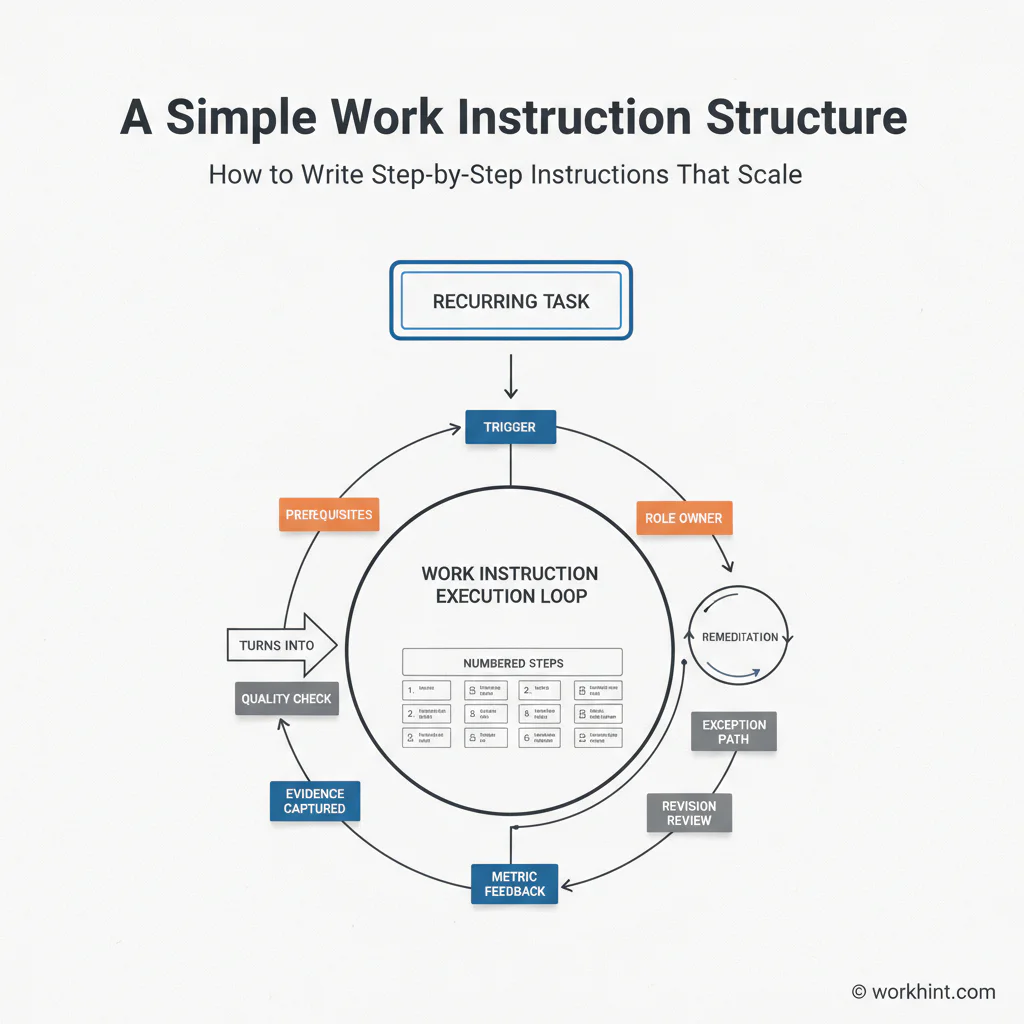
A scalable work instruction should be short enough to use during real work and complete enough to prevent avoidable interpretation. Use this structure as a starting point:
- Task name: Use a specific title, such as “Verify vendor bank details” instead of “Finance task.”
- Purpose: Explain the outcome the task protects, such as payment accuracy, customer response time, or compliance evidence.
- Trigger: Define the event that starts the task.
- Owner: Name the role responsible for doing the work, plus the role accountable for the outcome.
- Inputs: List the required data, documents, systems, permissions, and prerequisites.
- Steps: Write numbered actions in the order they must happen. Start each step with a verb.
- Quality checks: Define what the worker must verify before the task is complete.
- Exception path: Explain when to stop, escalate, reject, or ask for more information.
- Evidence: State what record, screenshot, approval, note, or system update proves completion.
- Review cycle: Assign a review owner and cadence so the instruction stays current.
This mirrors how formal control environments treat work. NASA’s document-control guidance for headquarters quality-system documents describes office work instructions as controlled documents and expects step-level ownership through action officers. The same principle applies in ordinary business operations: each instruction needs a named owner and a controlled way to change it.
Example: customer refund review
Suppose a support operations team wants to standardize customer refund reviews. The work instruction should not say only “review refund request.” It should define the starting point, required evidence, decision thresholds, and closure record.
| Field | Example |
|---|---|
| Trigger | Refund request submitted through support form |
| Owner | Support operations specialist |
| Inputs | Customer ID, order ID, refund reason, transaction amount, policy category |
| Quality check | Confirm order exists, amount matches payment record, and request fits policy |
| Exception path | Escalate requests above threshold or outside policy to finance owner |
| Evidence | Decision note, approver if needed, refund status, customer notification timestamp |
The instruction gives a trained employee enough detail to act without turning every case into a meeting. It also creates measurable signals: cycle time, rework rate, exception volume, policy mismatch rate, and overdue escalations.
Common mistakes
The first mistake is writing for the expert instead of the next trained person. If only the most experienced employee can understand the instruction, the document has not transferred operational knowledge.
The second mistake is skipping exceptions. Work instructions that only describe the happy path push unusual cases into chat threads, side conversations, and undocumented judgment calls.
The third mistake is leaving proof undefined. The GAO Green Book emphasizes internal control, documentation, authorization, and responsibility. In business terms, that means a completed task should leave a record that another person can inspect later.
The fourth mistake is treating work instructions as permanent. If a system changes, a policy changes, or the task repeatedly creates confusion, the instruction needs revision. Stale instructions are worse than no instructions because they create false confidence.
Where Workhint fits
Workhint helps teams turn work instructions into live work systems. Instead of stopping at a document, a team can describe the task, roles, approvals, inputs, exceptions, and evidence needed. Workhint can help structure the operating system around that work: intake, permissions, assignments, step routing, approval logic, dashboards, reminders, and reporting.
That matters most when the instruction touches multiple roles or systems. A refund review, vendor setup, field service task, contractor onboarding step, or internal request can move from a static checklist into a workflow where the right person sees the right step, required evidence is captured, and managers can see where work stalls.
FAQ
What should a work instruction include?
A work instruction should include the task name, purpose, trigger, owner, required inputs, numbered steps, quality checks, exception path, completion evidence, and review cadence.
How detailed should work instructions be?
They should be detailed enough for a trained person to complete the task correctly without asking for routine clarification. If one instruction becomes too long, split it into smaller task-level instructions.
Are work instructions the same as SOPs?
No. An SOP governs an end-to-end process. A work instruction explains how to perform one specific task inside that process.
Who should own work instructions?
The business role accountable for the task outcome should own the instruction. A process, quality, operations, or systems lead may help maintain the format, but ownership should stay close to the work.
Conclusion
Work instructions are not just documentation. They are the task-level operating logic that makes work repeatable. Write them around real triggers, owners, inputs, checks, exceptions, evidence, and review cycles. When those pieces are clear, the instruction becomes easier to train, automate, measure, and improve.
Leave a Reply