


Use this template to turn a goal, request, or messy project into owned work people can actually execute.
A work plan template gives business teams a practical way to define what needs to happen, who owns it, when it is due, and how progress will be reviewed. It is useful when a project is too important for a loose task list but not complex enough for a heavy project management process.
This resource is designed for operations leaders, project owners, managers, consultants, agencies, and cross-functional teams that need a simple project planning structure they can copy into a document, spreadsheet, shared workspace, or workflow system.
What’s included
- A copy-ready work plan template for business project planning.
- A field-by-field guide for goals, scope, owners, deadlines, dependencies, and status.
- A simple weekly review rhythm for keeping the plan current.
- An example work plan for a customer onboarding improvement project.
- Common mistakes that make work plans look organized but fail in execution.
How to use this work plan template
Start with one defined piece of work. A work plan is not a company strategy document, a backlog dump, or a personal to-do list. It should describe a specific outcome, the tasks required to reach that outcome, the owners responsible for each task, and the review points that keep the work moving.
Several widely used template libraries show similar demand for this kind of structure. Asana’s work plan template includes goals, scope, tasks, owners, due dates, milestones, dependencies, resources, and status updates. Smartsheet’s work plan templates include individual, monthly, quarterly, annual, and project formats. The practical pattern is clear: people are not just looking for a list. They are looking for a repeatable way to organize execution.
Work plan template for business project planning
| Section | What to capture | Owner |
|---|---|---|
| Project name | Short name that people will recognize in updates, dashboards, and meetings. | Project owner |
| Business goal | The measurable outcome the work is meant to produce. | Sponsor |
| Scope | What is included, what is excluded, and which assumptions are being used. | Project owner |
| Success criteria | The evidence that proves the work is complete and useful. | Sponsor and owner |
| Milestones | The major checkpoints between kickoff and completion. | Project owner |
| Tasks | The work items required to reach each milestone. | Task owners |
| Dependencies | Inputs, approvals, decisions, people, systems, vendors, or documents needed before work can move. | Dependency owner |
| Risks | Likely blockers, impact, mitigation plan, and escalation trigger. | Project owner |
| Status rhythm | How often the plan is reviewed, who attends, and what gets updated. | Project owner |
Copy-ready work plan fields
Use these fields as the core template:
- Project name: [Name]
- Business goal: [What outcome are we trying to create?]
- Project owner: [One accountable owner]
- Sponsor or approver: [Person who can approve scope, budget, or tradeoffs]
- Start date and target completion date: [Dates]
- Scope included: [What this work covers]
- Scope excluded: [What this work does not cover]
- Milestones: [Checkpoint, target date, owner, completion evidence]
- Tasks: [Task, owner, due date, status, dependency, notes]
- Dependencies: [Input needed, source, owner, due date, escalation trigger]
- Risks: [Risk, likelihood, impact, response, owner]
- Review cadence: [Weekly, twice weekly, or milestone-based]
- Completion criteria: [How the team will know the work is done]
Example work plan
Here is a simple example for a team improving customer onboarding:
| Milestone | Tasks | Owner | Completion evidence |
|---|---|---|---|
| Map current onboarding | Review handoff emails, setup checklist, customer questions, and first-week blockers. | Customer Success Lead | Current-state map approved by CS and Operations. |
| Define standard workflow | Choose required steps, owners, deadlines, and escalation rules. | Operations Manager | Workflow table reviewed with Sales, CS, Finance, and Product. |
| Build reusable assets | Create kickoff agenda, intake form, setup checklist, and follow-up email format. | Implementation Lead | Templates stored in the shared onboarding workspace. |
| Pilot with two customers | Run the new plan, track blocked steps, and collect internal feedback. | CS Manager | Pilot notes and revised checklist completed. |
| Launch updated process | Train team, assign owners, and start weekly onboarding review. | Operations Manager | First recurring review completed with live customer records. |
Review rhythm for keeping the plan alive
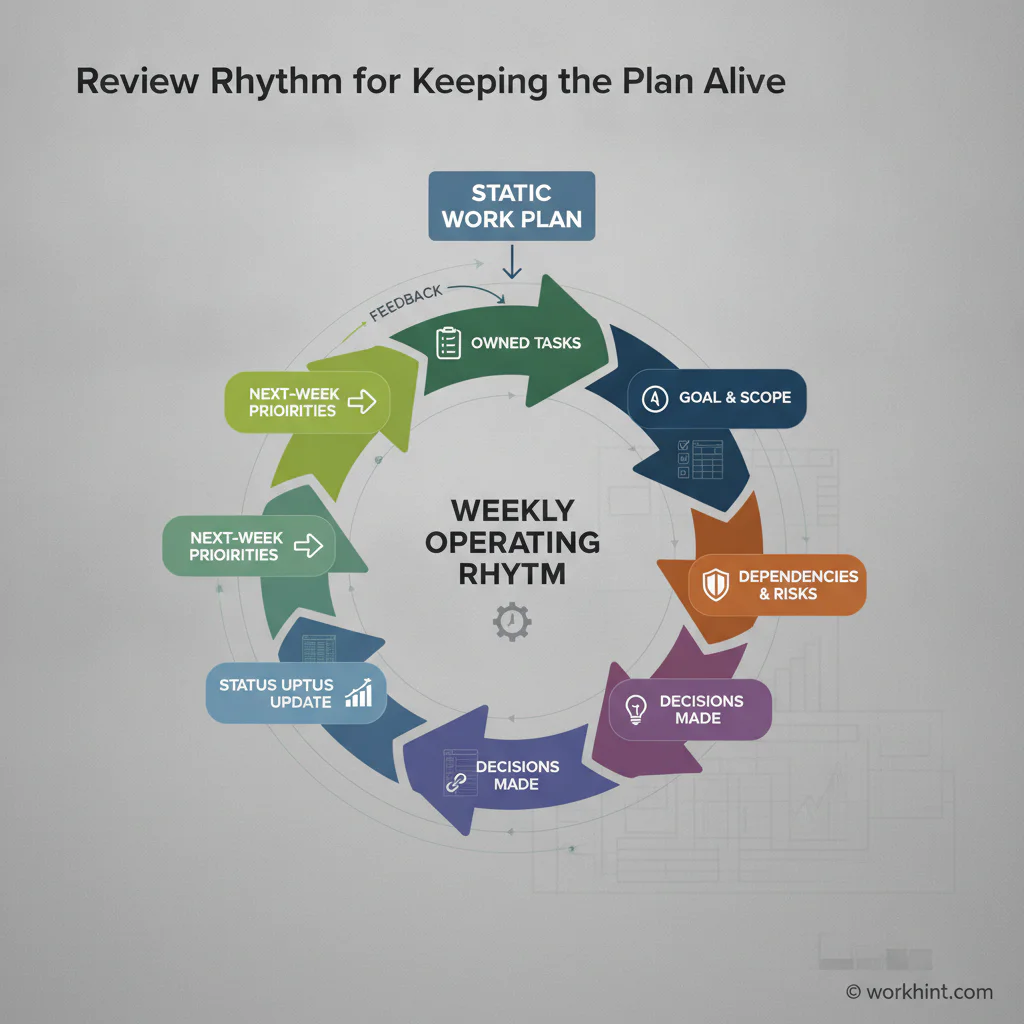
A work plan loses value when it becomes a static document. Build a simple review rhythm around it. For active projects, review the plan once a week. For urgent projects, review it two or three times a week. For slower internal work, milestone-based reviews may be enough.
Each review should answer five questions: what changed, what is blocked, which decisions are needed, which owners are at risk, and whether the completion date still looks real. The goal is not to create a reporting ceremony. The goal is to keep the plan honest while there is still time to fix problems.
Common mistakes
The first mistake is writing tasks without owners. A task without an owner is a hope. Every task should have one accountable person, even when several people contribute.
The second mistake is skipping dependencies. Most business work stalls because another team, vendor, approver, customer, system, or document is needed before the next step can happen. Capture dependencies early and assign someone to clear each one.
The third mistake is treating the target date as a promise before the scope is known. Project plan templates typically organize goals, tasks, timelines, and resources because dates only become credible when the work has been broken down. If the scope is still uncertain, label the date as provisional.
The fourth mistake is separating the plan from the work. Atlassian’s guide to work plans emphasizes collaboration and accountability because the plan should help teams coordinate, not sit apart from execution.
Where Workhint fits
Workhint helps organizations turn a work plan template into a live operating workflow. A team can start with the template, then build the intake form, roles, permissions, approval steps, task assignments, dependency tracking, status views, escalation paths, and reporting around it.
That matters when the plan involves multiple teams, external contributors, customers, vendors, or approvals. Instead of managing the work plan in a spreadsheet and chasing updates manually, Workhint can help structure the workflow so each owner sees what they need to do, approvers receive the right requests, and leaders can see progress without rebuilding the status report from scratch.
FAQ
What is a work plan template?
A work plan template is a reusable structure for organizing business work. It usually includes the goal, scope, owner, milestones, tasks, due dates, dependencies, risks, status, and completion criteria.
What should a work plan include?
A useful work plan should include one accountable owner, a clear business goal, included and excluded scope, task owners, due dates, dependencies, milestones, risks, review cadence, and evidence of completion.
What is the difference between a work plan and a project plan?
A project plan is often broader and may include budget, governance, stakeholder management, procurement, and detailed schedules. A work plan is usually a lighter execution document that helps a team organize the work needed to reach a specific outcome.
How often should a work plan be updated?
Update the work plan whenever scope, owners, deadlines, dependencies, risks, or status changes. For active business projects, a weekly review is usually enough. High-risk or fast-moving work may need more frequent updates.
Who owns the work plan?
One project owner should own the work plan. Task owners update their parts, sponsors approve major tradeoffs, and stakeholders provide input, but one person must keep the plan current and usable.
Conclusion
A work plan template is valuable because it turns intent into organized execution. Use it to define the goal, clarify scope, assign owners, expose dependencies, track risks, and create a review rhythm. The strongest work plans are not the most detailed. They are the plans people trust, update, and use to move work forward.
Leave a Reply