


A VMS is the system; an MSP is the operating partner. The right choice depends on who will own the workflow.
VMS vs MSP is one of the first decisions companies face when contingent workforce management outgrows spreadsheets, email, and scattered staffing vendor conversations. Both models help companies manage non-employee labor, but they solve different problems.
A vendor management system, or VMS, is software used to coordinate staffing suppliers, contingent workers, approvals, compliance records, time, invoices, and reporting. Kelly Services describes a VMS as a platform built for managing an organization’s external workforce. An MSP, or managed service provider, is a third-party team that runs some or all of the contingent workforce program for the business.
What’s in this article?
- The practical difference between a VMS and an MSP.
- When a company should use software, an outsourced partner, or both.
- A decision matrix for contingent workforce teams.
- Common mistakes that make staffing operations harder than they need to be.
- Where Workhint fits when the process needs to become a live work system.
Why VMS vs MSP matters
The choice matters because contingent workforce problems are rarely just tool problems. A company may need faster staffing requests, cleaner supplier communication, better onboarding, worker classification controls, approval routing, invoice matching, or spend visibility. Software helps only if someone owns the process. An MSP helps only if the business gives the provider clear rules, data, service expectations, and decision rights.
This is especially important for temporary workers and staffing suppliers. The CDC/NIOSH guide on protecting temporary workers emphasizes practical coordination between host employers and staffing companies around contracting, training, injury reporting, and worksite responsibilities. This article is not legal advice, but it is a reminder that contingent labor requires operating clarity, not just vendor selection.
What is a VMS?
A VMS is the technology layer for managing external workforce activity. In staffing operations, it often supports job requisitions, supplier distribution, candidate submissions, onboarding, assignments, time capture, rate cards, invoice review, compliance documents, and reporting.
A VMS works best when the company has enough internal ownership to define the rules. Someone still has to decide which suppliers receive requests, who approves rates, what documents are required, when workers can start, how exceptions are handled, and which reports leadership needs.
What is an MSP?
An MSP is an outsourced operating partner for contingent workforce management. Papaya Global’s overview of MSPs in contingent workforce management describes MSPs as providers that can handle hiring, onboarding, compliance, vendor coordination, and performance tracking for contingent labor.
An MSP works best when the company needs expertise, governance, supplier management, program administration, or scale support that it does not want to staff internally. Outsourcing the work does not remove accountability for business outcomes, worker experience, budget control, or risk decisions.
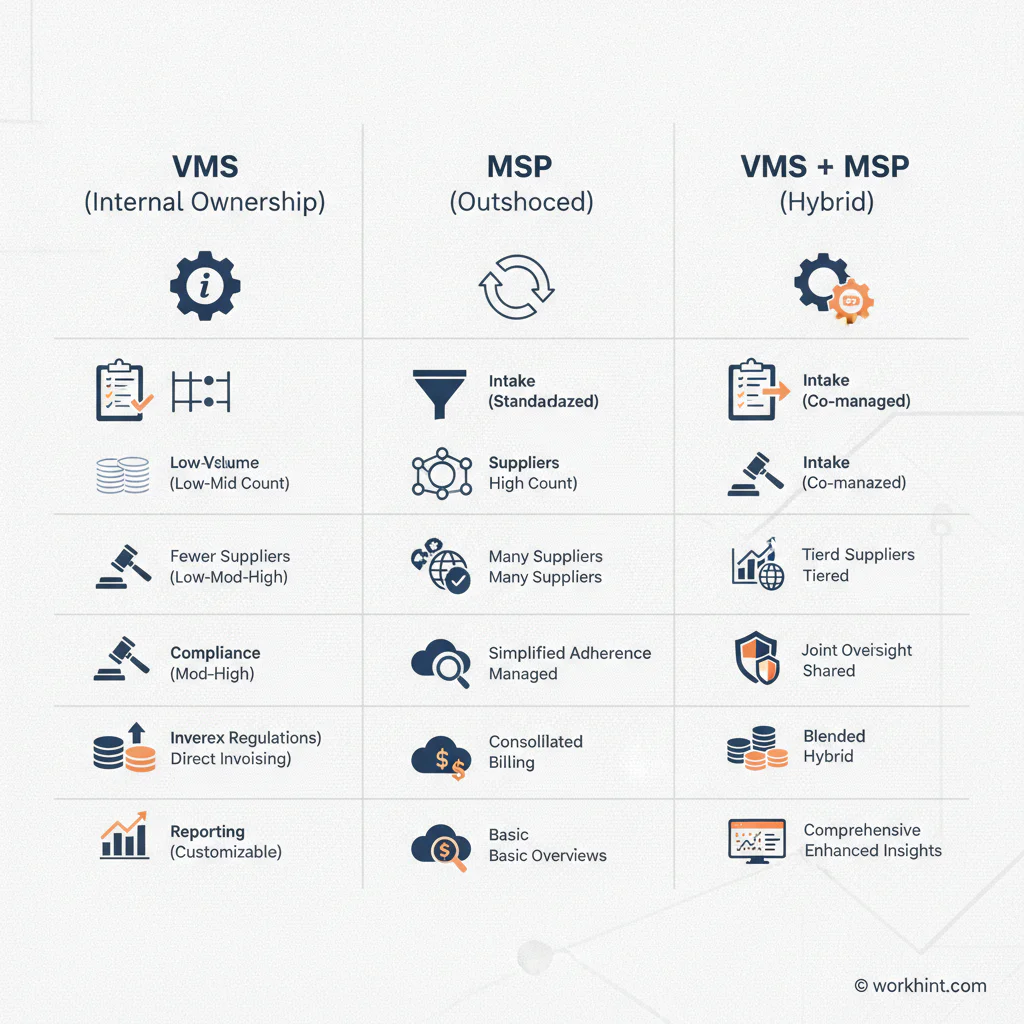
VMS vs MSP decision matrix
| Decision factor | VMS is usually better when | MSP is usually better when | Both may be needed when |
|---|---|---|---|
| Internal ownership | You have HR, procurement, finance, or operations owners who can run the process. | You lack internal capacity to manage suppliers and daily program administration. | You want internal visibility but external execution support. |
| Supplier count | You manage several suppliers and need consistency. | You need help rationalizing, negotiating, or coordinating many suppliers. | You have a large supplier network with frequent requests. |
| Worker volume | Volume is high enough to need automation but stable enough to manage internally. | Volume fluctuates and requires active operational coverage. | Volume is high, multi-location, or business-critical. |
| Compliance complexity | You can define document, approval, and worker access rules internally. | You need specialist oversight for program governance and supplier compliance. | You need both system controls and expert administration. |
| Reporting | You need centralized data and dashboards. | You need analysis, recommendations, and program management. | Leadership needs both real-time data and ongoing operating support. |
How to choose the right model
Start with the workflow, not the vendor category. Map how a staffing request begins, who approves it, which suppliers receive it, how candidates are reviewed, what documents are required, when access is granted, how time is approved, how invoices are checked, and how performance is reviewed.
Then decide where the gap is. If the process is clear but scattered, a VMS may be enough. If the process is unclear and nobody has time to run it, an MSP may be needed. If the company has scale, risk, multiple locations, and many suppliers, the answer may be both.
For compliance-sensitive programs, involve HR, legal, finance, procurement, and operations before the model is finalized. The U.S. Department of Labor’s joint employment guidance is a useful reminder that shared work arrangements can create responsibility questions. Do not treat software or outsourcing as a substitute for qualified legal, tax, or employment advice.
Common mistakes
- Buying a VMS before defining ownership. Software cannot decide who approves a role, rate, supplier, exception, or invoice.
- Hiring an MSP without clear service expectations. Define response times, escalation paths, reporting cadence, supplier rules, and decision authority.
- Ignoring the worker experience. Temporary workers and contractors still need clear assignments, access, training, schedules, and support.
- Leaving finance out until invoicing breaks. Rate cards, timesheets, purchase orders, and invoice matching should be designed early.
- Treating compliance as paperwork only. Documents matter, but so do training, supervision boundaries, worksite safety, data access, and records.
Where Workhint fits
Workhint fits when a company needs the contingent workforce process to become a live operating system, whether it uses a VMS, an MSP, neither, or both. A team can use Workhint to structure intake forms, role-based permissions, staffing requests, supplier tasks, onboarding steps, document collection, approval routing, access checks, assignment updates, payment status, and reporting.
That is useful before a VMS or MSP decision because it clarifies how work should move. It is also useful after the decision because many companies still need connected workflows around the core staffing platform: manager requests, approvals, exceptions, worker communications, compliance reminders, and reporting. Workhint is not a replacement for every staffing system or provider. It helps businesses design and run the work system around external teams.
FAQ
What is the main difference between a VMS and an MSP?
A VMS is software for managing contingent workforce activity. An MSP is a service provider that helps operate the contingent workforce program. Many MSPs use a VMS, and many companies use a VMS without an MSP.
Do small companies need a VMS or MSP?
Not always. A small company with a few contractors or one staffing supplier may only need a clear workflow, document checklist, approval process, and payment routine. A VMS or MSP becomes more useful as supplier count, worker volume, compliance complexity, or reporting needs increase.
Can a company use both a VMS and an MSP?
Yes. In larger contingent workforce programs, the VMS often acts as the system of record while the MSP manages suppliers, process administration, reporting, and program governance.
Who should own the VMS or MSP decision?
The decision should usually involve HR, procurement, finance, legal, and operations. Each team owns a different part of the workflow: workforce planning, supplier management, budget, compliance, access, performance, and payment.
What should be defined before choosing a VMS or MSP?
Define the request workflow, approval rules, supplier strategy, onboarding requirements, worker access process, time and invoice process, compliance records, reporting needs, and who owns exceptions.
Conclusion
The simplest way to think about VMS vs MSP is this: a VMS gives the company a system, while an MSP gives the company operating support. The right choice depends on worker volume, supplier complexity, compliance risk, internal ownership, and how much day-to-day management the business can handle. Start by designing the workflow, then choose the model that makes that workflow easier to run.
Leave a Reply