


A reusable agenda helps managers turn scattered check-ins into focused conversations, clear follow-ups, and better employee support.
A one-on-one meeting agenda template gives managers and employees a shared structure for regular check-ins without making the conversation stiff. The goal is not to script every minute. The goal is to make sure priorities, blockers, feedback, growth, and next steps do not disappear between meetings.
Strong one-on-ones are especially important in hybrid, remote, contractor-heavy, or fast-changing teams where informal context is easy to miss. Gallup notes that meaningful manager conversations work best when they focus on recognition, collaboration, goals, priorities, and strengths. SHRM also recommends giving employees room to shape the conversation instead of turning the meeting into a manager status report.
What’s Included in This Template
This resource includes a practical one-on-one meeting agenda template, a timing guide, sample questions, a follow-up tracker, and common mistakes to avoid. It is designed for recurring manager check-ins, but it can also be adapted for project leads, client success managers, operations leads, or anyone responsible for supporting another person’s work.
- Meeting goal and context
- Employee-led discussion items
- Priorities and blockers
- Feedback, recognition, and coaching
- Growth, workload, and role clarity
- Decisions, owners, and next steps
How to Use the One-on-One Meeting Agenda Template
Use the agenda as a shared document before, during, and after each meeting. The employee should add their discussion items first when possible. The manager can then add context, decisions needed, or topics that should not wait for a performance review.
For most teams, a 30-minute weekly or biweekly meeting is enough. Baylor Human Resources describes one-on-ones as regularly scheduled manager-employee meetings, often held weekly for 30 minutes. New hires, struggling employees, or people working through major transitions may need more frequent or longer check-ins for a period of time.
One-on-One Meeting Agenda Template
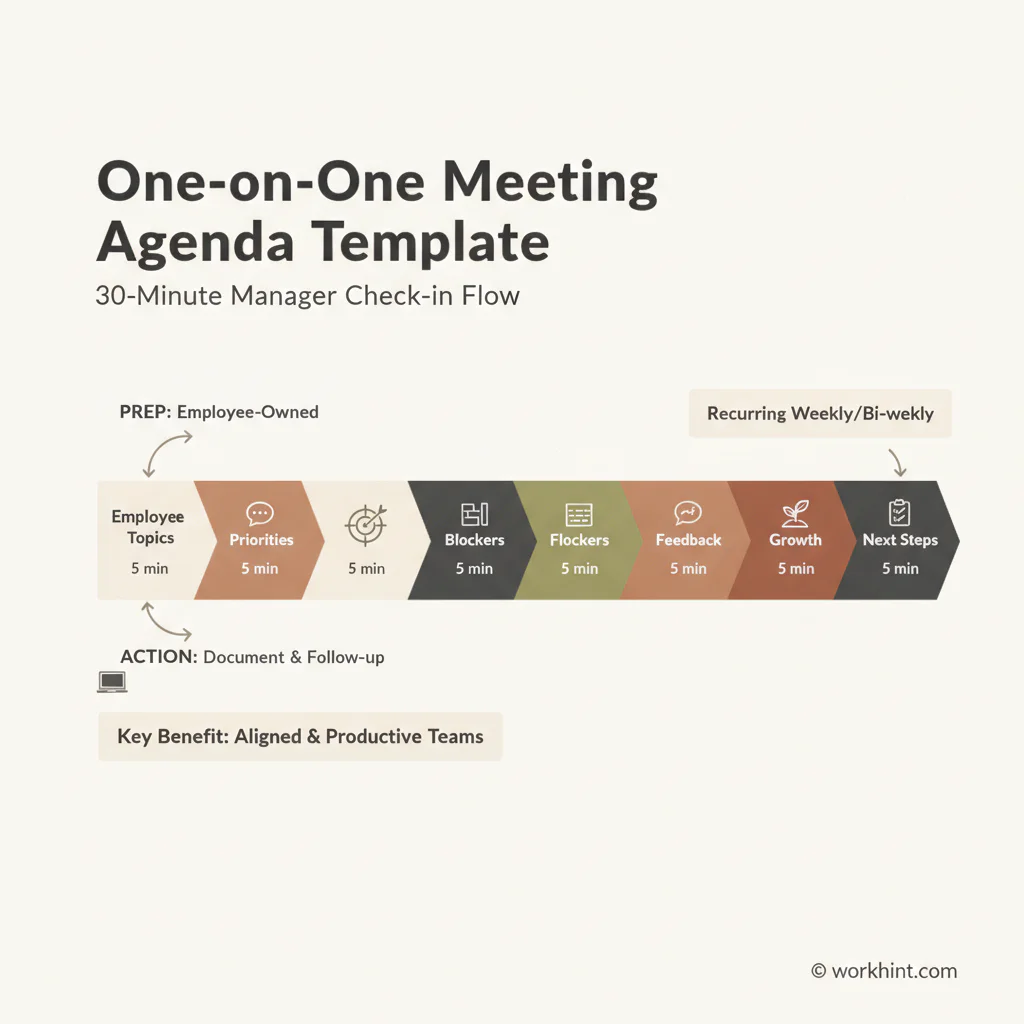
| Section | Time | Prompts | Output |
|---|---|---|---|
| Opening check-in | 3 minutes | How are you doing this week? Anything I should know before we start? | Context and tone |
| Employee topics | 8 minutes | What do you want to discuss? Where do you need input or a decision? | Employee-owned agenda |
| Priorities and blockers | 7 minutes | What are your top priorities? What is slowing you down? | Blockers, support needs, tradeoffs |
| Feedback and recognition | 5 minutes | What went well? What feedback should we discuss while it is still fresh? | Specific feedback and reinforcement |
| Growth and workload | 5 minutes | What are you learning? Does the workload feel sustainable? | Development and capacity signals |
| Next steps | 2 minutes | What did we decide? Who owns each follow-up? | Clear actions and owners |
Questions to Add When the Conversation Needs Depth
The template works best when managers choose a few questions that fit the moment. Do not ask every question in every meeting. Pick the two or three that will create the most useful conversation.
- What is the most important thing you need from me this week?
- Which priority feels unclear or under-resourced?
- What work should we stop, delay, or simplify?
- Where are you waiting on another person or team?
- What recent work are you proud of?
- What feedback would help you move faster?
- Is there a skill, project, or responsibility you want to grow into?
- What should I understand better about your workload?
Harvard Business Review has also emphasized that organizations often give managers limited guidance on how to run one-on-ones well. That is why a simple agenda matters: it turns an informal habit into a repeatable management practice.
Example One-on-One Agenda for a 30-Minute Check-In
Here is a copy-ready agenda managers can use immediately:
- Meeting goal: Align on priorities, remove blockers, and support development.
- Employee topics: Add anything you want to discuss before the meeting.
- Current priorities: What are the top three outcomes for this week?
- Blockers: What is stuck, unclear, or dependent on someone else?
- Feedback: What should we recognize, adjust, or talk through?
- Growth: What skill, responsibility, or opportunity should we plan for?
- Actions: List each follow-up, owner, and due date.
Common Mistakes to Avoid
The most common mistake is turning the one-on-one into a status update the manager could have read asynchronously. Status matters, but the meeting should focus on judgment, support, coaching, decisions, and anything that benefits from live conversation.
- Canceling too often: The meeting stops feeling reliable.
- Letting only the manager drive: Employees stop bringing real issues forward.
- Skipping notes: Decisions and commitments become hard to track.
- Avoiding hard topics: Performance, workload, or conflict issues grow quietly.
- No follow-up: The same blockers appear every week.
Where Workhint Fits
A one-on-one agenda is useful as a document, but it becomes stronger when it is connected to the way work actually moves. Workhint helps teams turn recurring check-ins into a live operating workflow: agenda intake, role-based notes, action owners, approvals, reminders, workload signals, and reporting can sit in one managed system instead of being scattered across docs, calendars, and chat threads.
That matters when managers support many employees, contractors, or project contributors at once. The template can define the conversation. Workhint can help make sure the follow-ups, permissions, assignments, and recurring review rhythm are actually managed after the conversation ends.
FAQ
How often should managers hold one-on-one meetings?
Weekly or biweekly works for most teams. Weekly is useful for new employees, fast-moving work, or roles with heavy coordination. Biweekly can work for experienced employees with stable priorities.
Should one-on-one meetings have an agenda?
Yes. The agenda can be flexible, but it should exist. A shared agenda helps both people prepare, keeps the meeting from becoming a vague check-in, and creates a place to record decisions.
Who should own the one-on-one agenda?
The employee should usually add topics first, while the manager adds context, feedback, decisions, or support items. Shared ownership keeps the conversation balanced.
What should not be discussed in a one-on-one?
Avoid using the entire meeting for routine status updates, information that belongs in a team meeting, or topics that require HR, legal, or confidential escalation beyond the manager-employee relationship.
How should managers track follow-ups?
Track each action with an owner, due date, and current status. Review open actions at the next meeting so the conversation creates visible progress instead of repeated discussion.
Conclusion
A good one-on-one meeting agenda template gives managers a dependable rhythm without removing the human part of the conversation. Use it to prepare, listen, decide, and follow through. The best version is simple enough to reuse every week and specific enough to expose blockers, workload issues, feedback needs, and growth opportunities before they become bigger problems.
Leave a Reply