


Good documentation does not describe work after the fact; it helps the work run correctly while it is happening.
Business process documentation is the written and visual record of how a repeatable business process works. It explains what triggers the process, who owns each step, what decisions must be made, which systems are used, what output is expected, and how the process should be measured or improved.
Many teams document processes only after something breaks, a key person leaves, or a customer asks why work is handled differently every time. The stronger approach is to treat documentation as part of the work system itself. A useful process document helps people execute, onboard, audit, automate, and improve without relying on memory or scattered messages.
What’s in this article?
- Why business process documentation matters for scalable operations.
- The core fields every process document should include.
- A practical workflow for documenting a process.
- A process documentation table you can adapt.
- Common mistakes that make documentation stale.
- Where Workhint fits when documentation becomes a live workflow.
Why business process documentation matters
Process documentation matters because repeatable work depends on shared understanding. If only one person knows how vendor onboarding, customer escalation, invoice review, hiring approvals, or service delivery works, the business is exposed. Work slows when that person is unavailable, quality varies by owner, and managers cannot improve a process they cannot see.
Atlassian describes process documentation as detailed, step-by-step guidance that can use formats such as checklists and flowcharts. That format flexibility is important. Some processes need a short checklist. Others need a workflow map, decision table, approval matrix, or full SOP.
The point is not to document everything. ISO guidance on documented information makes a useful distinction: organizations need enough documented information to support planning, operation, control, and improvement of processes. Documentation should make the process easier to run and verify, not bury the team in unused files.
What a business process document should include
A strong process document answers the questions people ask while doing the work. Start with these fields:
| Field | What it clarifies | Example |
|---|---|---|
| Purpose | Why the process exists | Approve new vendor requests before work begins |
| Trigger | What starts the process | Manager submits vendor intake form |
| Owner | Who is accountable for the process | Operations manager |
| Steps | What happens in sequence | Intake, review, risk check, approval, onboarding |
| Decision rules | How exceptions are handled | Legal review required above a risk threshold |
| Inputs and outputs | What information comes in and what result is produced | Request form, agreement, approval record |
| Systems | Where the work happens | CRM, finance tool, document repository |
| Metrics | How performance is measured | Cycle time, blocked requests, approval SLA |
| Update owner | Who keeps the document current | Process owner reviews monthly |
How to document a business process
Use a workflow that captures reality before standardizing it.
- Name the process and outcome. Do not start with a vague label like “vendor stuff.” Use a process name that describes the outcome: “Approve a new vendor before work begins.”
- Define the boundaries. Write the start point and end point. A clean boundary prevents documentation from expanding into every related workflow.
- Interview the people doing the work. Ask what actually happens, where requests arrive, which steps are skipped under pressure, what causes rework, and where decisions get stuck.
- Map the current state. Capture the real steps, handoffs, tools, approvals, waiting points, and exceptions.
- Separate standard steps from exceptions. Every process has edge cases. Document the normal path first, then define escalation rules for exceptions.
- Assign owners and decision rights. Each stage should have a responsible owner. Each decision should have authority, not just a list of interested stakeholders.
- Validate with a real case. Run a recent request, ticket, project, or approval through the document. If the document cannot explain the work, revise it.
- Add metrics and review triggers. Decide how you will know whether the process is working: cycle time, SLA compliance, error rate, rework, blocked work, or customer impact.
- Publish it where work happens. Documentation hidden in a folder will decay. Link it to intake forms, task templates, approval records, dashboards, and onboarding paths.
Asana’s process documentation guide emphasizes process documentation as a source of truth for steps, roles, and resources. That source of truth stays useful when connected to execution. If the workflow changes but the document does not, it becomes operational debt.
Business process documentation workflow
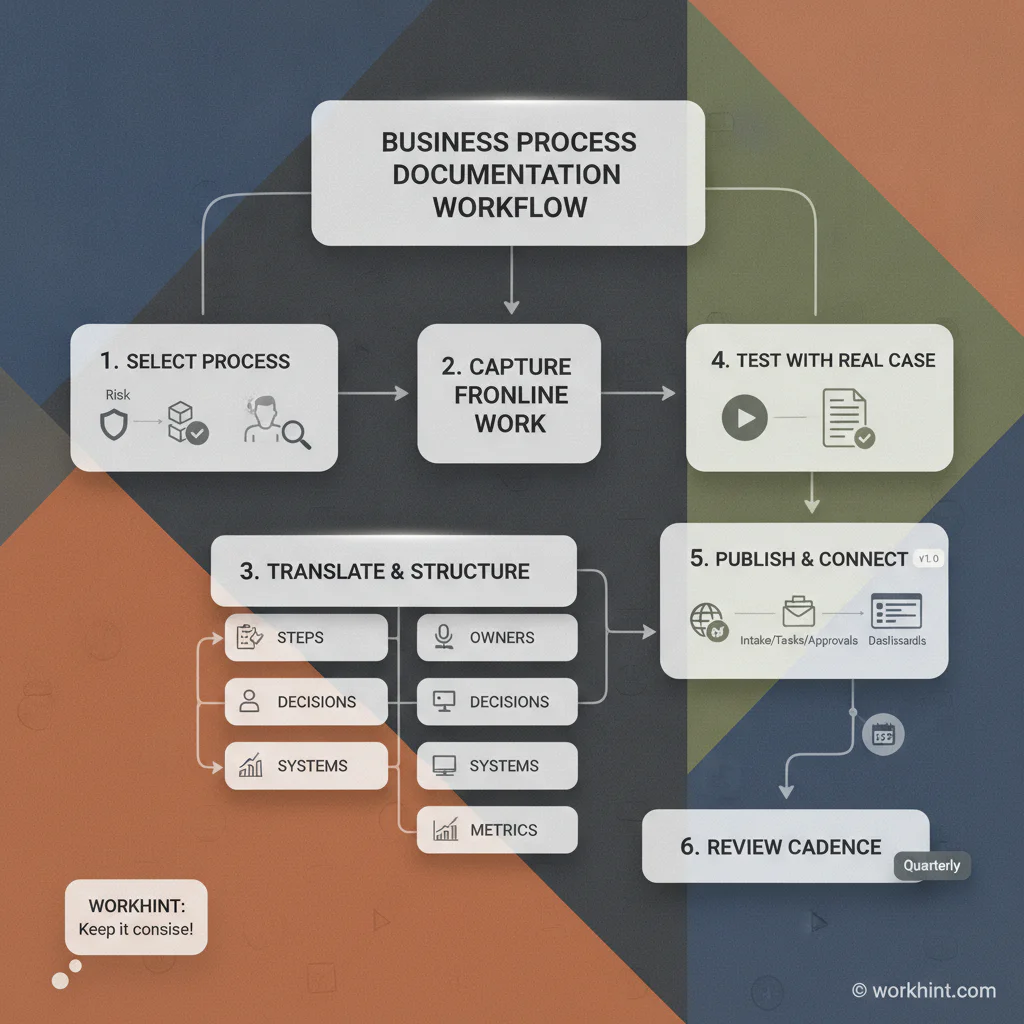
A practical documentation workflow should be easy to use and controlled enough to trust:
- Choose the process based on volume, risk, confusion, or growth pressure.
- Capture the current process from the people closest to the work.
- Translate the process into steps, owners, decisions, inputs, outputs, systems, and metrics.
- Test it against a real example.
- Publish the approved version.
- Connect it to forms, tasks, approvals, automations, and reporting.
- Review it on a fixed cadence or whenever a major process change occurs.
APQC’s process management maturity work points to documentation alongside governance, measurement, improvement practices, transparency, and technology. That is the right lens. Documentation is not a library project. It is part of managing the process as an operating asset.
Common mistakes
- Documenting the ideal process instead of the real one. If the document ignores workarounds, shadow tools, and informal approvals, people will ignore the document.
- Writing steps without owners. A step without an owner is a place for work to stall.
- Skipping decisions and exceptions. Most operational breakdowns happen when the normal path no longer applies.
- Making documentation too long. A process document should help execution. If people need a meeting to interpret it, simplify it.
- Failing to maintain versions. Every process document needs a current owner, last reviewed date, and change trigger.
- Separating documentation from systems. A static page cannot manage intake, assignments, approvals, deadlines, or reporting by itself.
Where Workhint fits
Workhint fits when business process documentation needs to become a live work system instead of a static page. A team can describe the process, then structure the users, roles, intake fields, workflow steps, permissions, assignments, approvals, documents, dashboards, and automations needed to run it.
For example, a documented vendor approval process can become a Workhint system where managers submit requests, operations validates required information, legal reviews risk, finance approves budget, vendors complete onboarding details, and leadership sees cycle time and blocked requests. The documentation remains useful, but the system also routes the work, captures evidence, and shows whether the process is performing.
FAQ
What is business process documentation?
Business process documentation is the structured record of how a repeatable business process works, including triggers, steps, owners, decision rules, systems, inputs, outputs, and performance measures.
What is the difference between process documentation and an SOP?
Process documentation is the broader record of how a workflow operates. An SOP is usually a more formal instruction set for performing a specific procedure consistently.
Who should own process documentation?
The business owner of the process should own the documentation. Operations, enablement, or systems teams can help maintain it, but accountability should sit with the person responsible for the process outcome.
How often should process documentation be updated?
Review high-volume or high-risk processes at least quarterly. Update documentation immediately when ownership, systems, approval rules, compliance needs, or customer commitments change.
What processes should be documented first?
Start with processes that are frequent, risky, inconsistent, hard to train, customer-facing, approval-heavy, or dependent on one person’s knowledge.
Conclusion
Business process documentation is useful when it helps people do real work with less confusion. The best documents define the outcome, boundaries, steps, owners, decisions, systems, and metrics clearly enough that the process can be executed, audited, improved, and automated.
Start with one important workflow. Capture how it works today, validate it with a real case, assign ownership, and connect the documentation to the system where work moves. That is how documentation becomes a scalable work system instead of another file nobody opens.
Leave a Reply