


A contractor request form should stop unclear work, unfunded spend, and risky access before onboarding begins.
A contractor request form is the first operating checkpoint for bringing an independent contractor, freelancer, consultant, agency worker, or specialist vendor into the business. It is not just an HR form. Done well, it tells the company what work is being requested, why an external worker is needed, who owns the budget, what approvals are required, what access may be needed, and whether the engagement should move into contractor onboarding at all.
That matters because contractor work often starts informally. A manager messages a freelancer, finance receives an invoice later, IT is asked for access at the last minute, and legal only sees the agreement after scope has already shifted. The request form should create a clean record before that happens.
What’s in this article?
- What a contractor request form should capture before work starts.
- How to route the request through business, finance, legal, HR, and IT review.
- A practical field and approval table for business teams.
- Common mistakes that turn contractor intake into paperwork without control.
Why contractor requests matter
The request stage is where a business decides whether external work is properly scoped, funded, and controlled. If the form only asks for a name, email, and start date, the hard questions move downstream. That creates delays during onboarding, payment disputes after delivery, and access risk when a contractor needs systems before anyone has reviewed the engagement.
Classification also belongs near the front of the process. The IRS explains worker classification by looking at the relationship and the degree of behavioral, financial, and relationship control. The U.S. Department of Labor’s independent contractor guidance also focuses on the economic reality of the relationship. A form cannot make someone a contractor by label alone, but it can collect the facts needed for the right review.
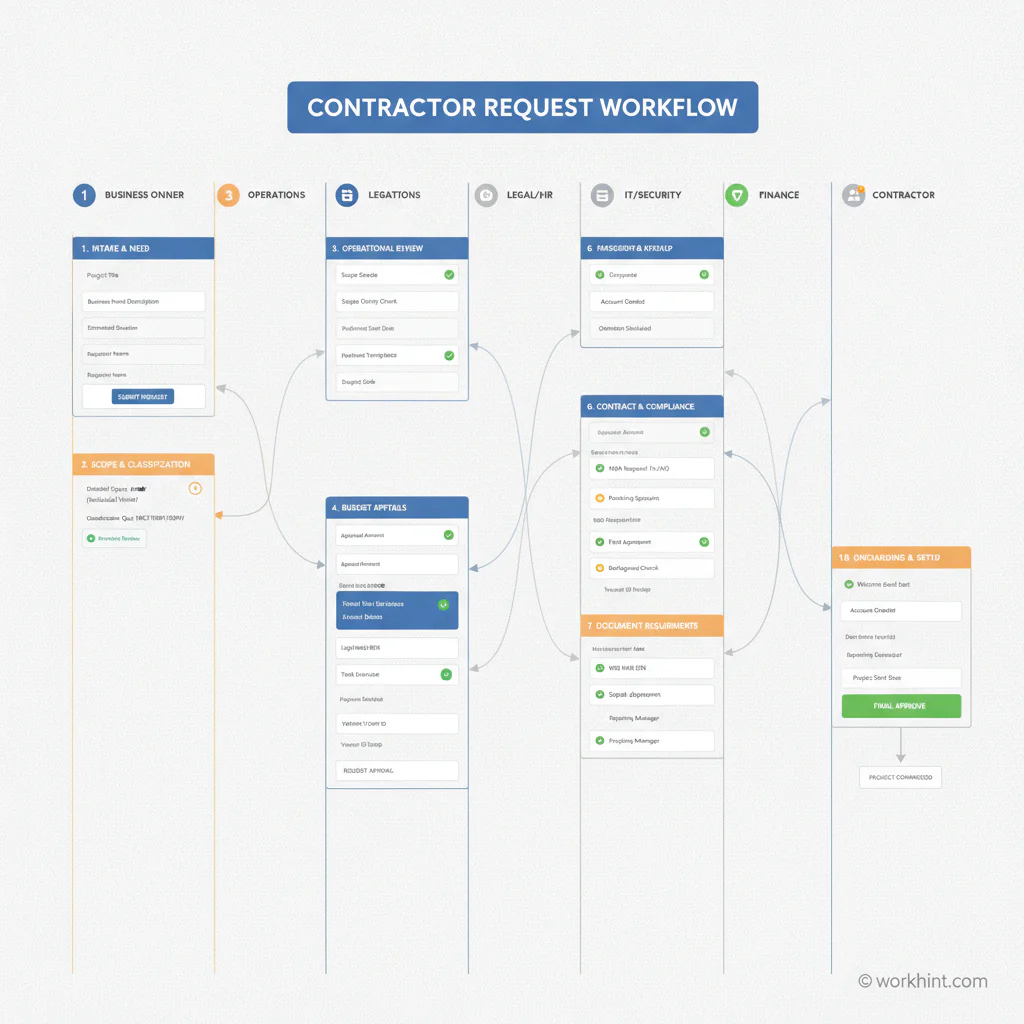
Contractor request form fields and approval gates
A useful form collects enough information to approve or reject the request without forcing the requester to become a compliance expert. Use plain fields, conditional questions, and clear owners.
| Form area | What to capture | Why it matters |
|---|---|---|
| Business need | Requester, department, project, reason for external help, urgency | Shows whether the work is legitimate, funded, and tied to a business owner |
| Scope | Deliverables, milestones, start and end dates, success criteria | Prevents vague engagements and gives legal or procurement a reviewable record |
| Worker model | Independent contractor, agency worker, vendor, consultant, temp, or other model | Routes the request to the right classification and approval path |
| Budget | Rate, fee type, not-to-exceed amount, cost center, approval owner | Stops unfunded commitments and gives finance a clear payment basis |
| Documents | Agreement, SOW, NDA, tax form, insurance, certifications, security acknowledgements | Defines what must be collected before work begins |
| Access | Systems, data, facilities, customer information, equipment, expiration date | Lets IT and security provision least-privilege access with an end date |
| Payment readiness | Invoice process, payment terms, tax documentation, vendor or payee setup | Connects approved work to payment before the first invoice arrives |
Public institutional forms show how much context can be needed before a contractor engagement is approved. For example, the UC Davis independent contractor pre-hire form asks departments to document the requester, proposed contractor, work description, period of performance, payment terms, selection rationale, and classification factors before contracting. The lesson is not that every business needs a long form. The lesson is that the right review questions need to appear before the agreement is treated as approved.
A practical contractor request workflow
- Start with the business owner. The person requesting the contractor should explain the business need, work outcome, urgency, budget source, and internal owner. If no one can own the request, do not approve it.
- Check the worker model. Decide whether the work should be handled by an independent contractor, staffing agency, vendor, managed service provider, employee, or internal team. Route unclear cases to HR, legal, or compliance before contacting the worker.
- Validate scope and funding. Approvers should see the deliverables, acceptance criteria, rate, maximum spend, and timeline. This is where the request becomes specific enough for a statement of work or contractor agreement.
- Identify document requirements. U.S. contractor payment setup often depends on collecting the correct tax information. The IRS Form W-9 page is the official reference for requesting taxpayer identification information from U.S. persons. International, regulated, on-site, or high-risk work may require different documents and counsel review.
- Review access risk. Before onboarding, ask what systems, data, facilities, customer records, credentials, or equipment the contractor needs. Access should be project-scoped and time-bound.
- Approve the handoff. Once the request is approved, the form should create or trigger the onboarding workflow, not disappear into a spreadsheet. The approved record should drive contract creation, document collection, access provisioning, assignment setup, and payment readiness.
What to avoid
The biggest mistake is asking too little. A short form feels efficient until the team spends two weeks chasing missing context. The second mistake is treating every contractor the same. A remote designer, an on-site technician, a finance consultant, and an agency team do not need the same access, documents, approvals, or payment checks.
Another failure point is asking classification questions after work has started. If the requester is defining fixed hours, training requirements, close supervision, open-ended work, or employee-style responsibilities, the relationship may need review before the contractor path continues. That does not mean managers cannot set outcomes. It means the request form should distinguish deliverables and acceptance criteria from control over how the person works.
Where Workhint fits
Workhint fits when the contractor request form needs to become part of a live external workforce system. A business can use Workhint to capture the request, route approvals, assign legal, finance, IT, and business owners, collect documents, define permissions, create onboarding tasks, connect assignments to approval records, and keep payment status visible. For ongoing contractor operations, contractor management software can connect onboarding, assignments, access, records, performance, and offboarding in one operating system.
The value is continuity. The request record becomes the starting point for the contractor lifecycle instead of a form submission that someone has to manually translate into emails, tickets, folders, and spreadsheets. That gives the business a clearer path from request to approval, onboarding, work execution, payment, renewal, or offboarding.
FAQ
What is a contractor request form?
A contractor request form is an internal intake form used to ask for approval to engage an external worker or service provider. It should capture the business need, scope, worker model, budget, required documents, access needs, and approval owners before onboarding starts.
Who should approve a contractor request?
At minimum, the business owner and budget owner should approve. Depending on risk, legal, HR, procurement, finance, compliance, and IT or security may also need review before the contractor is cleared to onboard.
Is a contractor request form the same as contractor onboarding?
No. The request form decides whether the engagement should proceed and what controls apply. Onboarding happens after approval and includes collecting documents, signing agreements, setting up access, assigning work, and confirming payment readiness.
What is the most important field in a contractor request form?
The scope field is usually the most important because it drives classification review, budget approval, contract terms, access needs, deliverable acceptance, and payment review. A vague scope creates problems across the rest of the workflow.
Conclusion
A contractor request form should help the business make a decision, not just collect a name. The best forms clarify the work, owner, budget, worker model, documents, access, and payment path before anyone starts. When that request becomes a workflow, teams can move faster without relying on informal approvals or scattered follow-up.
Leave a Reply