


Most changes fail quietly first: a vague request, a rushed approval, a missed dependency, and no record of what changed.
A change control process is a structured way to request, assess, approve, implement, and close changes without letting every adjustment become chaos. It is especially useful when changes affect scope, budget, service delivery, customer commitments, systems, or compliance.
The goal is not bureaucracy. The goal is to make change safer, faster, and easier to explain.
What’s in this article?
- What a change control process should include
- How to design a practical change request workflow
- A table of roles, decisions, and records
- Common mistakes that slow down change control
- Where Workhint fits when change control needs to become a live operating system
Why a change control process matters
Uncontrolled change creates hidden operational debt. A customer asks for a scope adjustment, finance is not told, delivery absorbs the extra work, the timeline shifts, and no one knows whether the change was formally approved. Similar problems happen in internal operations when access changes, vendor changes, reporting changes, and policy changes happen through side conversations.
The Association for Project Management defines change control as the process for capturing, evaluating, and approving or rejecting changes to an approved baseline. Atlassian describes it as a formal system for evaluating and implementing modifications to scope, schedule, or resources. Those definitions matter because change control is not just a form. It is a decision workflow tied to execution.
For operations teams, the practical question is simple: if something changes, who needs to know, who decides, what evidence is required, and how does the approved change become real work?
How to build a change control process
Start with the types of changes that currently create confusion. Do not begin with a universal enterprise policy. Pick one high-friction area: customer project scope, implementation timelines, vendor requirements, internal system changes, service commitments, staffing coverage, finance approvals, or operational workflows.
1. Define what counts as a controlled change
Not every adjustment needs formal review. A typo in a document, a meeting time change, or a minor task reassignment may not need change control. A controlled change usually affects one or more of these areas:
- Scope, deliverables, or acceptance criteria
- Budget, pricing, payment, or cost allocation
- Timeline, launch date, service level, or staffing plan
- Customer commitments or legal obligations
- Systems, integrations, data access, compliance, or security
- Quality standards, review requirements, or operating procedures
2. Create a standard change request
The request should capture enough context for review without becoming a paperwork exercise. Include the requester, affected workflow, reason for change, requested outcome, deadline, expected benefit, impact if denied, systems affected, dependencies, risks, cost or capacity impact, and recommended owner.
Asana’s change control guidance emphasizes logging requests and decisions in a change log. That record is what prevents the same debate from restarting every week. It also gives managers a way to spot patterns: too many scope changes, weak intake criteria, recurring approval delays, or repeated downstream rework.
3. Assess impact before approval
Impact review is where change control earns its keep. The reviewer should ask what the change affects, not just whether the change sounds reasonable. A small customer request can change staffing, billing, quality checks, delivery dates, and support handoffs. A process tweak can affect reporting, training, permissions, and compliance records.
Use a simple impact score at first. Rate the change as low, medium, or high impact across customer, financial, operational, compliance, and technical dimensions. If any dimension is high, require a named approver and a rollback or mitigation plan.
4. Route the decision to the right owner
Change control fails when every request goes to the same senior person or when no one knows who has authority. Define decision rights by change type. A delivery lead may approve a low-risk schedule adjustment. Finance may need to approve pricing or payment changes. Security or IT may need to approve access or system changes. An executive may only need to review high-risk or strategic changes.
5. Turn approved changes into execution steps
Approval is not completion. Once a change is approved, the workflow should create the work required to implement it: update the scope, notify stakeholders, adjust deadlines, assign tasks, revise the budget, update permissions, test, collect evidence, or change the customer communication plan.
6. Close the change with evidence
Closure should confirm what happened. Record whether the change was implemented, rejected, deferred, or replaced by another decision. Capture completion date, owner, evidence, customer or stakeholder notification, and any lessons learned. For recurring changes, review the pattern monthly to decide whether the underlying process needs redesign.
A practical change control workflow
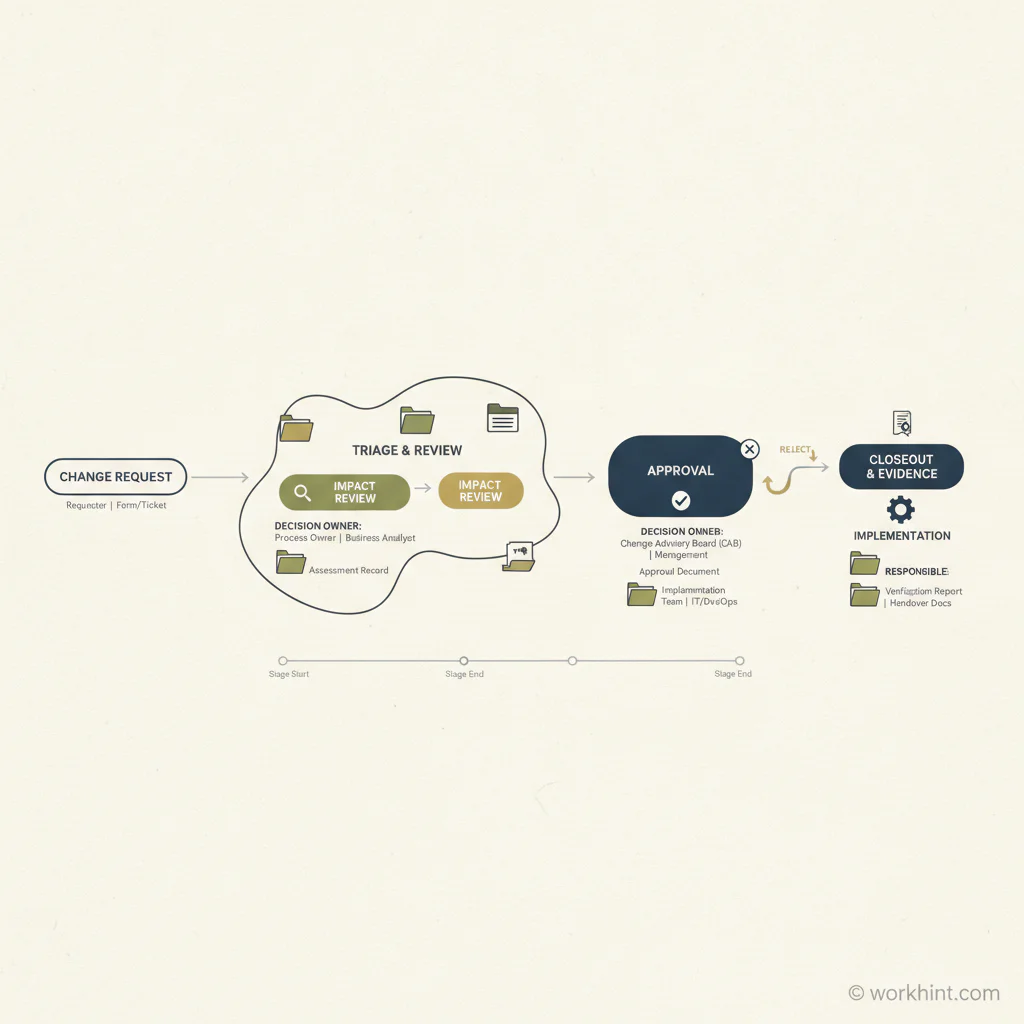
| Stage | Owner | Decision or record | Output |
|---|---|---|---|
| Request | Requester | What is changing and why | Complete change request |
| Triage | Change coordinator | Is formal control required? | Accepted, returned, or routed |
| Impact review | Functional owners | Scope, cost, risk, timeline, systems | Impact summary |
| Approval | Decision owner | Approve, reject, defer, or request more detail | Decision record |
| Implementation | Assigned owner | Tasks, communication, testing, updates | Completed change work |
| Closeout | Change coordinator | Evidence, status, lessons learned | Closed change log entry |
Common mistakes
The first mistake is treating change control as a gate instead of a workflow. A gate can approve or reject. A workflow also routes, documents, implements, measures, and improves.
The second mistake is using the same path for every change. Low-risk changes should move quickly. High-risk changes need deeper review. If every change feels expensive, people will work around the process.
The third mistake is approving changes without capacity review. A change that looks reasonable in isolation may overload the team when added to every other active commitment.
Where Workhint fits
Workhint fits when change control needs to become part of how the business actually runs. A team can describe the change control workflow and turn it into a live work system with request forms, role-based routing, permissions, approvals, tasks, documents, customer or stakeholder updates, dashboards, escalation rules, and reporting.
That matters because change control touches many parts of the operating system. A scope change may need delivery approval, finance review, updated payment terms, customer confirmation, schedule changes, quality checks, and a final closeout record. Workhint helps connect those steps so the approved decision becomes executed work, not another note in a spreadsheet.
FAQ
What is a change control process?
A change control process is a structured workflow for requesting, evaluating, approving, implementing, and documenting changes that affect scope, timelines, cost, systems, risk, or operating procedures.
What should a change request include?
A change request should include the requester, reason for change, affected workflow, expected benefit, impact if denied, timeline, risks, dependencies, cost or capacity impact, and the owner responsible for implementation.
What is the difference between change control and change management?
Change control is the tactical process for evaluating and approving specific changes. Change management is broader: it includes communication, training, adoption, stakeholder readiness, and the human side of making change stick. Prosci explains the distinction as the difference between controlling a specific change and managing the people side of adoption.
Who should approve a change request?
The approver should match the risk and impact of the change. Finance should approve cost changes, delivery owners should approve delivery changes, IT or security should approve system changes, and executives should review high-risk or strategic changes.
How do you keep change control from slowing work down?
Separate low-risk and high-risk changes, use standard request fields, automate routing, define decision rights, set response targets, and review bottlenecks regularly. The process should make safe changes faster, not make all changes harder.
Conclusion
A useful change control process gives change a path. It captures requests, assesses impact, routes decisions, assigns implementation work, and records what happened. The result is not less change. It is better-controlled change: fewer surprises, clearer ownership, cleaner communication, and a stronger operating system for work that keeps evolving.
Leave a Reply