


Use this incident report template to capture facts quickly, assign follow-up, and keep workplace incidents from disappearing into chat threads.
An incident report template gives managers, HR, safety leads, and operations teams a consistent way to document what happened, who was involved, what immediate action was taken, and what follow-up is required. The goal is not to assign blame in the first record. The goal is to preserve facts while they are fresh so the business can respond responsibly.
This resource is designed for workplace incidents such as injuries, near misses, property damage, safety concerns, policy violations, customer-facing incidents, security concerns, and operational disruptions. It is a practical business template, not legal advice. For serious injuries, regulated workplaces, union settings, insurance claims, or public reporting obligations, follow your formal safety, HR, legal, and regulatory process.
What’s included
- A workplace incident report template you can adapt immediately.
- A field-by-field guide for writing clear, factual reports.
- A follow-up workflow for review, corrective action, and closure.
- A checklist for common mistakes that weaken incident records.
- FAQ for managers and operations teams.
How to use this incident report template
Complete the report as soon as reasonably possible after the incident. Ask for observable facts: what happened, when, where, who was involved, who witnessed it, what action was taken, and what still needs review. Avoid speculation, loaded language, assumptions about intent, and unsupported conclusions.
For workplace injuries and illnesses in the United States, employers should understand their OSHA recordkeeping responsibilities. OSHA provides official forms for recording work-related injuries and illnesses, including Form 301 for injury and illness incident reports. OSHA also explains electronic injury and illness data submission requirements. HR teams can also reference structured investigation resources such as SHRM’s investigation incident report form when creating internal documentation processes.
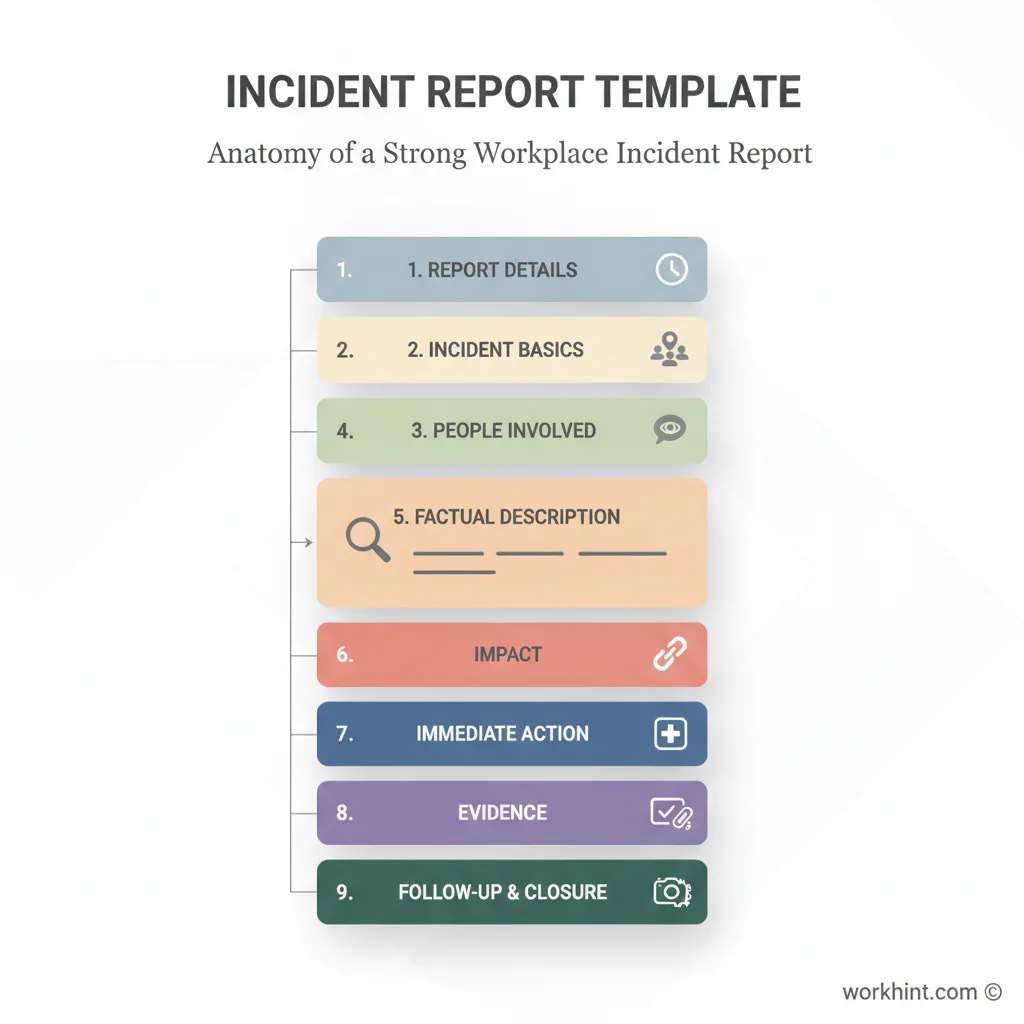
Incident report template
| Section | Template field | What to capture |
|---|---|---|
| Report details | Report date, report time, prepared by, department | Who completed the report and when. |
| Incident basics | Date, time, location, incident type | The basic facts needed to identify the event. |
| People involved | Names, roles, contact details, employment status | Employees, contractors, visitors, customers, or vendors involved. |
| Witnesses | Witness names and statements | Separate direct observations from secondhand information. |
| Description | Factual account of what happened | Plain-language sequence of events without blame or speculation. |
| Impact | Injury, illness, damage, disruption, security concern | What was affected and how severe it appears initially. |
| Immediate action | First aid, medical care, area secured, manager notified | Steps taken right away to protect people and assets. |
| Evidence | Photos, documents, equipment, system logs, messages | Materials that support review or investigation. |
| Follow-up owner | Responsible person, deadline, next step | Who reviews the incident and what happens next. |
| Closure | Corrective action, completion date, approval | How the business confirms the issue was addressed. |
Simple incident report form copy
Incident type: [injury, near miss, property damage, policy issue, customer issue, security issue, operational disruption, other]
Date and time of incident: [date and time]
Location: [specific site, area, client location, vehicle, system, or remote work context]
Person completing report: [name, role, contact]
People involved: [names, roles, relationship to company]
Witnesses: [names and contact details]
What happened: [objective timeline of events]
Immediate action taken: [first aid, escalation, area secured, system disabled, customer contacted, supervisor notified]
Known impact: [injury, damage, delay, cost, risk, customer impact, none known]
Evidence attached: [photos, forms, screenshots, logs, statements, equipment records]
Follow-up required: [investigation, repair, retraining, policy review, insurance notice, regulatory review]
Owner and deadline: [name and date]
Review and follow-up workflow
- Receive the report. Confirm the report is complete enough to understand the event.
- Protect people first. Handle medical care, site safety, security, or customer protection before administrative review.
- Preserve evidence. Save photos, logs, documents, messages, equipment records, and witness statements.
- Assign a reviewer. HR, safety, operations, legal, IT, or the department owner should review based on incident type.
- Identify corrective action. Decide whether the response requires training, repair, process change, access change, communication, or formal investigation.
- Close the loop. Record completion, approval, and any recurring monitoring needed.
Common mistakes
Waiting too long. Details fade quickly. Even a short same-day report is better than a polished reconstruction days later.
Mixing facts with opinions. Write what was observed, said, documented, or done. Keep root-cause conclusions for the review stage.
Forgetting near misses. Near misses can reveal hazards before someone is injured or a customer is affected.
No owner for follow-up. A report without an owner becomes a file. Assign a person, deadline, and closure standard.
Where Workhint fits
Workhint helps teams turn an incident report template into a live response workflow. Instead of collecting reports in email or spreadsheets, a company can use Workhint to route incident intake, assign HR or safety review, collect evidence, control permissions, trigger corrective-action tasks, track deadlines, notify managers, and report on recurring patterns.
That is useful when incident handling crosses roles. A workplace incident may involve an employee, contractor, supervisor, customer, vendor, HR manager, safety lead, legal reviewer, finance owner, or operations leader. Workhint fits by connecting the report to the follow-up process so the organization can document, respond, and learn without losing the thread.
FAQ
What should an incident report include?
An incident report should include the date, time, location, people involved, witnesses, factual description, immediate action taken, known impact, evidence, follow-up owner, and closure status.
When should an incident report be completed?
Complete it as soon as reasonably possible after the incident. Serious safety, security, legal, or customer-impacting events may also require immediate escalation through your company’s formal process.
Who should complete the incident report?
The person who observed, received, or managed the incident often starts the report. A supervisor, HR partner, safety lead, or operations owner may review and complete follow-up fields.
Is an incident report only for injuries?
No. Incident reports can document injuries, near misses, property damage, policy concerns, security issues, service failures, customer complaints, and operational disruptions.
Should the report include opinions about who caused the incident?
No. The initial report should focus on observable facts. Cause analysis, accountability, and corrective action belong in the review or investigation stage.
Conclusion
A useful incident report template helps a business respond with clarity instead of improvising under pressure. Capture the facts, protect people, preserve evidence, assign ownership, and close the loop. When the report becomes part of a workflow rather than a static form, incidents are easier to review, patterns are easier to spot, and corrective action is less likely to stall.
Leave a Reply